AI agents in automations
An agent is a node: a name, a provider and model from the tenant’s configuration, a system prompt, and optionally a list of functions it may call. The Ask an agent step gives an agent an instruction and uses the answer in one of four ways. All four are settings on the same step; there is no second step kind to learn.
1. A plain or structured answer
The default. The agent answers the instruction and the answer is available to later steps as steps.<id>.response.
Turn on What it must return and define fields — category, priority, summary, reply — and the agent is asked for exactly that JSON. The fields are offered by Insert… as steps.<id>.structured_output.<field> and can be used in conditions. This is the mode to reach for whenever a later step needs a value, not prose: filing a conversation, writing a property, deciding a branch on a boolean.
output_schema:
  type: object
  properties:
    priority: { type: string, enum: [low, normal, high, urgent] }
    auto_reply: { type: boolean, title: Safe to send without a person reading it }
  required: [priority, auto_reply]
2. Let it choose what happens next
Turn on Let it choose what happens next and the step becomes a router: every outgoing if connection is a branch, and its label is the sentence the agent reads. No schema, no condition to write — the labels are the choices.
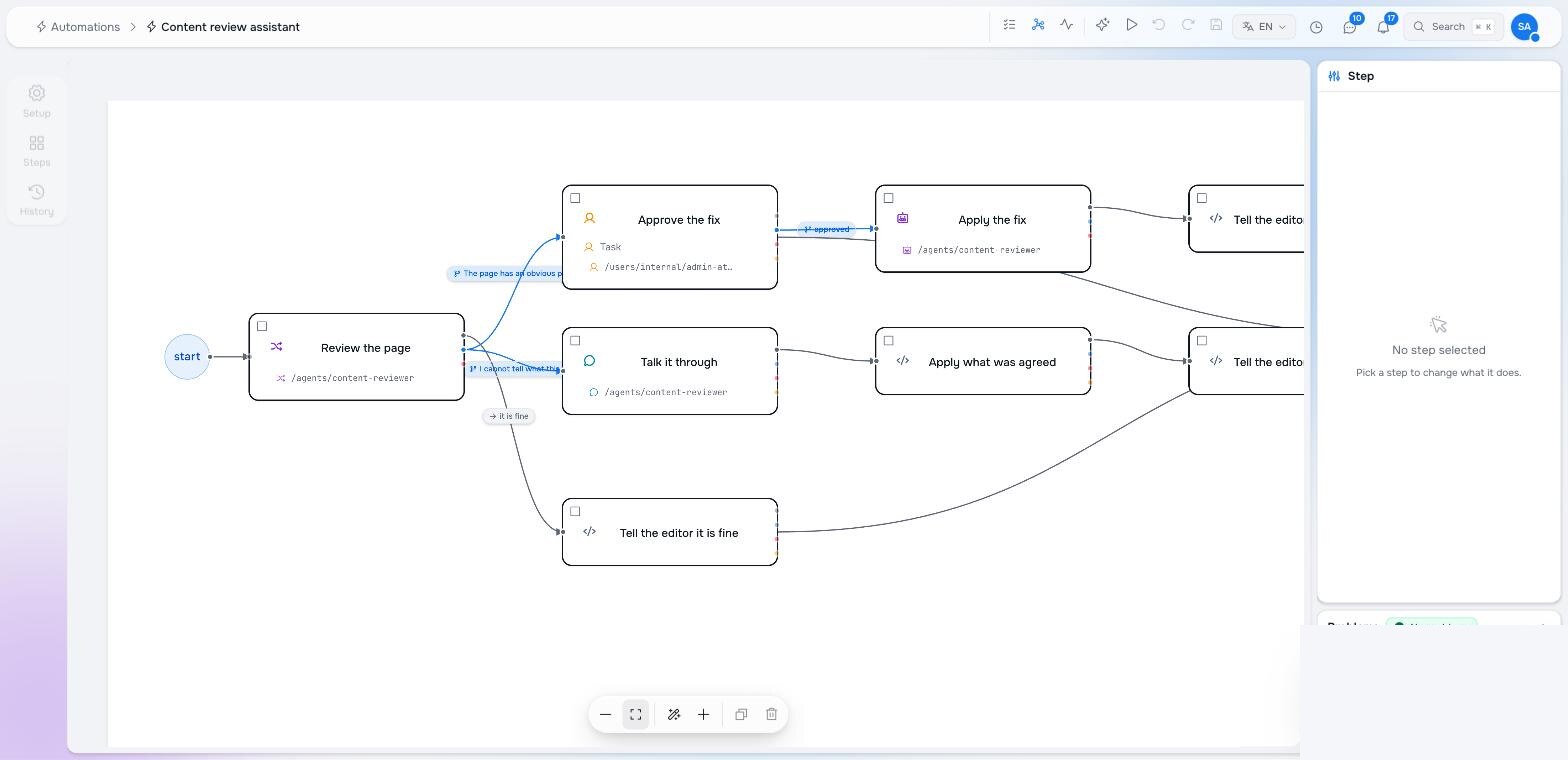
The step publishes routed_to, reasoning and confidence. A minimum confidence sends anything below it down the plain next connection — the fallback — so an unsure agent never takes a consequential branch. Write labels as full sentences from the agent’s point of view: “The page has an obvious problem I can fix — a typo, an empty or vague description — and a person should approve the fix first.”
3. Let it work a tool loop
Turn on Let it work a tool loop and the agent may call its tools — functions listed on the agent — as many times as it needs (up to max iterations) before answering. The library steps are all available as tools: an agent given find-nodes and update-node can read a page and fix its description itself. A structured answer still works in a loop.
Use it when the work needs judgement and action: apply a fix the person approved, gather what a summary needs from several nodes. Prefer deterministic steps when the action is known in advance — a tool loop costs several model calls and its path is decided by the model.
4. Ask several agents and let a referee pick
Turn on Ask several agents and let a referee pick, choose two or more competitors (each an agent, so each may be on a different model), a referee agent and an optional referee instruction. Every competitor answers the instruction; the referee judges and either accepts a winner or sends per-agent feedback for another round, up to max rounds.
The step publishes response (the winning answer), winner, confidence, confident, reasoning, rounds, answers (every competitor’s) and models. The usual follow-up is an if connection on steps.<id>.confident == false into Ask a person.
Pick competitor models that return the answer alone; a model that emits its reasoning in the reply competes with its deliberation, not its answer.
Conversations
An agent is also the other side of a Talk it through step: it opens a conversation with the named person in their Inbox, keeps asking until it has what the system prompt told it to get, and ends the conversation with the structured result you defined. See People in the loop.
Writing for an agent
- Say what the agent is for in its system prompt; say what this run needs in the step’s instruction. The system prompt is durable and shared by every step using the agent.
- Insert the data rather than describing it:
${steps.read.body},${steps.read.thread_text},${steps.categories.listing}. An agent told “the categories are listed in the taxonomy” will guess; one given the list will pick. - Give the agent the vocabulary from content — a Find nodes step over the taxonomy, or the function as a tool — so it can only choose what exists, and have the filing step report what it could not resolve.
- Ask for a boolean when a branch depends on it. “auto_reply: true only for a routine first acknowledgement” is a rule the run can enforce; a paragraph is not.
Pilot documentation. Studio is in a partner pilot. Screens and YAML shown here are current as of the version noted on each page; tell your Maravilla contact when something does not match what you see.