Example: the content review assistant
Shipped with Studio under Automations, switched off. It shows an agent that chooses a branch, a person approving in the Inbox, an agent working with tools to change a node, and a conversation whose result is written back.
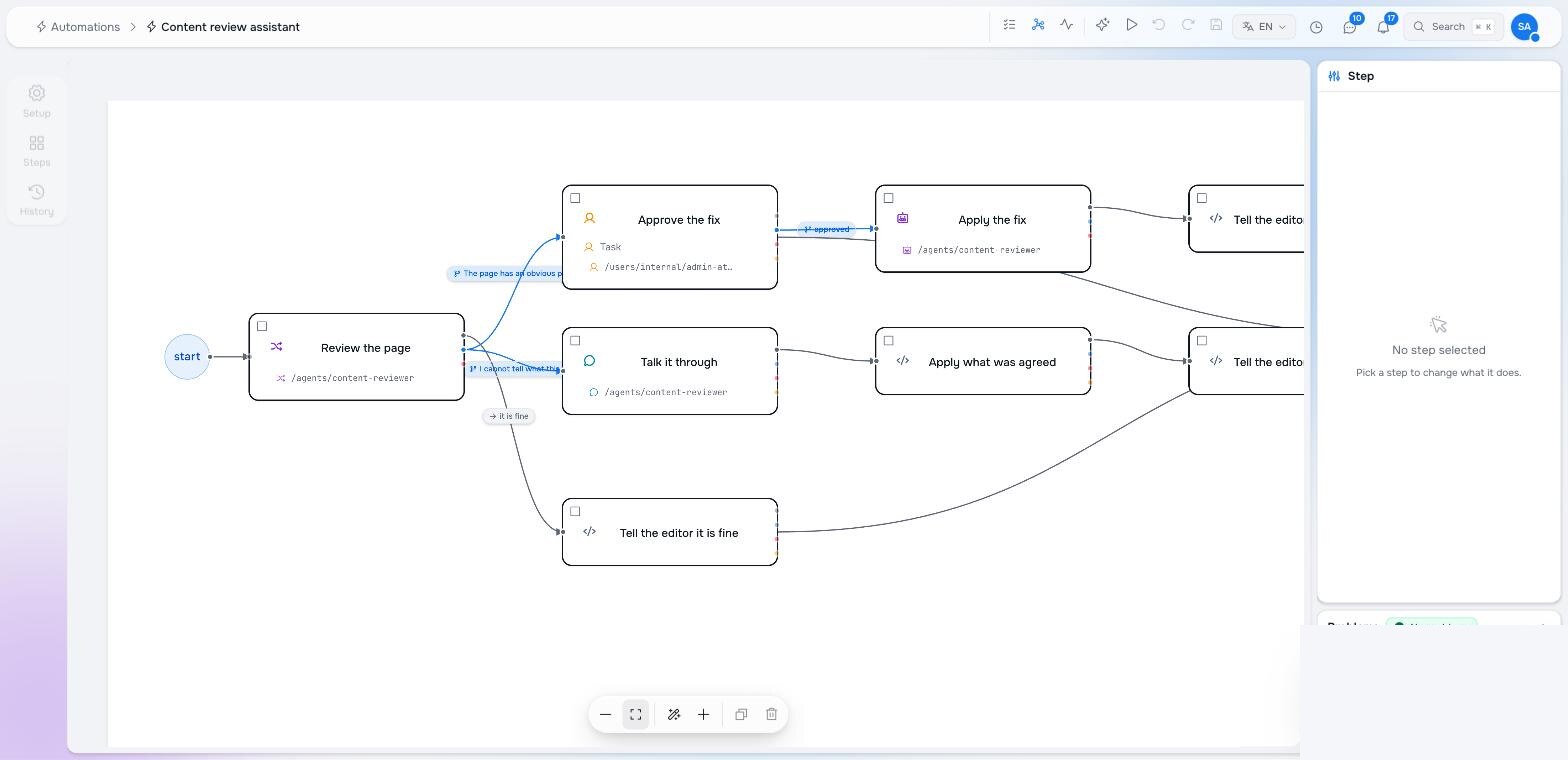
What it does
- A page in
storiesis updated. - Review the page — the content reviewer agent reads the title and description and picks one of three branches by their labels.
- It is fine → a task tells the editor.
- It has an obvious problem → Approve the fix in the editor’s Inbox → Apply the fix, an agent working a tool loop with
update-node→ a task says what changed. - It is unclear → Talk it through, a conversation with the editor that agrees on a title and description → Apply what was agreed writes them → a task says so.
Ignore changes made by automations is on: the fix the agent applies is an update to a page, and without the guard it would start a review of the fix.
The YAML
The complete node, as shipped (content/automations/content-review/.node.yaml). Read it top to bottom with the graph above.
node_type: studio:Automation
archetype: studio:AutomationPage
properties:
  title: Content review assistant
  enabled: false
  trigger:
    kind: node_event
    workspaces: [stories]
    node_types: [studio:Page]
    event_kinds: [Updated]
    ignore_automation_writes: true
  steps:
    - uuid: review
      element_type: studio:StepAgent
      label: Review the page
      agent: { raisin:ref: /agents/content-reviewer, raisin:workspace: functions }
      decide: true
      min_confidence: 0.5
      instruction: |-
        A page was just edited. Review its title and description.

        Title: ${steps.__subject.subject.title}
        Description: ${steps.__subject.subject.description}
        Path: ${steps.__subject.subject_path}

        Choose the branch that fits. A clear, specific title with a useful
        description is fine as it is. An obvious problem you could fix yourself
        — a typo, an empty or vague description, a title that repeats the
        description — needs a fix a person should approve first. If you cannot
        tell what the page is for, talk it through with the editor.
    - uuid: approve_fix
      element_type: studio:StepHumanTask
      label: Approve the fix
      assignee_mode: specific
      assignee: { raisin:ref: /users/internal/admin-at-studio-local, raisin:workspace: raisin:access_control }
      task_type: approval
      prompt: |-
        The content reviewer wants to fix “${steps.__subject.subject.title}”
        (${steps.__subject.subject_path}).

        Its reasoning: ${steps.review.reasoning}

        Approve to let it apply the change, or reject to leave the page as it is.
      options:
        - { label: Approve the fix, value: approve }
        - { label: Leave it, value: reject }
      due_in_hours: 48
    - uuid: apply_fix
      element_type: studio:StepAgent
      label: Apply the fix
      agent: { raisin:ref: /agents/content-reviewer, raisin:workspace: functions }
      tools: true
      max_iterations: 6
      instruction: |-
        The fix you proposed was approved. Apply it now.

        The page is at ${steps.__subject.subject_path} in the workspace
        "${steps.__subject.workspace}". Its current title is
        "${steps.__subject.subject.title}" and its description is
        "${steps.__subject.subject.description}".

        Use update-node to change only what is wrong (workspace
        "${steps.__subject.workspace}", path "${steps.__subject.subject_path}").
        Then say in one paragraph what you changed.
    - uuid: talk
      element_type: studio:StepChat
      label: Talk it through
      agent: { raisin:ref: /agents/content-reviewer, raisin:workspace: functions }
      participant_mode: specific
      participant: { raisin:ref: /users/internal/admin-at-studio-local, raisin:workspace: raisin:access_control }
      system_prompt: |-
        You are talking with the editor about the page
        “${steps.__subject.subject.title}” at ${steps.__subject.subject_path}.
        You could not tell what it is for. Ask what the page should say, agree
        on a title and a one-sentence description, and finish the conversation
        with them as your result.
      max_turns: 12
      allow_ai_end: true
      output_schema:
        type: object
        properties:
          title: { type: string, title: Agreed title }
          description: { type: string, title: Agreed description }
        required: [title]
    - uuid: apply_agreed
      element_type: studio:StepFunction
      label: Apply what was agreed
      function_ref: { raisin:ref: /lib/studio/automations/library/update-node, raisin:workspace: functions }
      arguments:
        workspace: ${steps.__subject.workspace}
        path: ${steps.__subject.subject_path}
        properties:
          title: ${steps.talk.result.title}
          description: ${steps.talk.result.description}
    - uuid: notify_agreed
      element_type: studio:StepFunction
      label: Tell the editor what was agreed
      function_ref: { raisin:ref: /lib/studio/automations/library/create-task, raisin:workspace: functions }
      arguments:
        assignee: /users/internal/admin-at-studio-local
        title: 'Updated after our chat: “${steps.talk.result.title}”'
        task_type: review
    - uuid: notify_ok
      element_type: studio:StepFunction
      label: Tell the editor it is fine
      function_ref: { raisin:ref: /lib/studio/automations/library/create-task, raisin:workspace: functions }
      arguments:
        assignee: /users/internal/admin-at-studio-local
        title: 'Reviewed: “${steps.__subject.subject.title}” looks good'
        description: ${steps.review.reasoning}
        task_type: review
    - uuid: notify_done
      element_type: studio:StepFunction
      label: Tell the editor what changed
      function_ref: { raisin:ref: /lib/studio/automations/library/create-task, raisin:workspace: functions }
      arguments:
        assignee: /users/internal/admin-at-studio-local
        title: 'Reviewed and updated: “${steps.__subject.subject.title}”'
        description: ${steps.apply_fix.response}
        task_type: review
  edges:
    - { id: e_fine, source: review, target: notify_ok, kind: next, label: it is fine }
    - id: e_fix
      source: review
      target: approve_fix
      kind: condition
      label: The page has an obvious problem I can fix — a typo, an empty or vague description — and a person should approve the fix first
    - id: e_talk
      source: review
      target: talk
      kind: condition
      label: I cannot tell what this page is for and need to talk it through with the editor
    - { id: e_approved, source: approve_fix, target: apply_fix, kind: condition, condition: "steps.approve_fix.action == 'approve'", label: approved }
    - { id: e_applied, source: apply_fix, target: notify_done, kind: next }
    - { id: e_talked, source: talk, target: apply_agreed, kind: next }
    - { id: e_agreed, source: apply_agreed, target: notify_agreed, kind: next }
  entries: [review]
  exits: [notify_ok, notify_done, notify_agreed, approve_fix]
Things to notice
- The router has no schema. The three connections out of Review the page carry the sentences the agent chooses between; the plain next one is the fallback under the minimum confidence.
- Three ways to read an agent.
steps.review.reasoningfrom the router,steps.apply_fix.responsefrom the tool loop,steps.talk.result.titlefrom the conversation. - The approval gates the write. Apply the fix only runs on
steps.approve_fix.action == 'approve'; “Leave it” ends the run with the page untouched. - The agent’s tools are on the agent. The content reviewer lists
find-nodesandupdate-node; the step only says let it work a tool loop.
Try it
Enable it, edit any page’s description in stories, and watch the Inbox. To point it at your own editor, change the assignee and participant references.
Pilot documentation. Studio is in a partner pilot. Screens and YAML shown here are current as of the version noted on each page; tell your Maravilla contact when something does not match what you see.