Step by step
This walkthrough builds the Acme site against Studio content, with the editor able to open and edit its pages inline. Every step shows the same thing in SvelteKit, React Router and Astro; pick your framework once with the tabs and the whole page follows. Each column is a complete example in the Studio repository — examples/site-svelte, examples/site-shadcn, examples/site-astro — so every file shown here exists and runs.
1. The project
npx sv create acme-site            # SvelteKit, TypeScript
cd acme-site
pnpm add @raisindb/client @maravilla/studio-content @maravilla/studio-svelte
pnpm add -D @sveltejs/adapter-node  # or @maravilla-labs/adapter-sveltekit on Maravilla Cloud
npx create-react-router@latest acme-site
cd acme-site
pnpm add @raisindb/client @maravilla/studio-content @maravilla/studio-react
# @react-router/serve ships with the template; @maravilla-labs/adapter-react-router on Maravilla Cloudpnpm create astro@latest acme-site -- --template minimal
cd acme-site
pnpm add @raisindb/client @maravilla/studio-content @maravilla/studio-astro @astrojs/node
# @maravilla-labs/adapter-astro on Maravilla Cloud@maravilla/* packages come from the Maravilla registry; add to .npmrc:
@maravilla:registry=https://solutas.registry.maravilla.cloud/-/npmServer rendering is required everywhere — the URL is resolved per request, and the editor’s preview session is a cookie. Pin the dev port and allow CORS so Studio can open the site in its iframe:
// vite.config.ts
export default defineConfig({
  plugins: [sveltekit()],
  server: { port: 5191, strictPort: true, cors: true },
});
// react-router.config.ts → { ssr: true }
// vite.config.ts
export default defineConfig({
plugins: [tailwindcss(), reactRouter(), tsconfigPaths()],
server: { port: 5196, strictPort: true, cors: true },
});// astro.config.mjs
import node from '@astrojs/node';
export default defineConfig({
output: 'server',
adapter: node({ mode: 'standalone' }),
server: { port: 4321 },
});2. Configuration
Everything the site needs to find its content is an environment variable, read on the server only. The names are the same in all three examples:
# .env
RAISIN_HTTP_URL=https://<tenant>.rdb.maravilla.cloud
RAISIN_REPOSITORY=studio
RAISIN_WORKSPACE=stories
RAISIN_ROOT_PATH=/acme
RAISINDB_API_KEY=…                # a service key for reads; never public
RAISIN_LIVE_BRANCH=main           # `publish` once the site publishes
RAISIN_WORKING_BRANCH=main
STUDIO_PREVIEW_SECRET=…           # signs the editor's preview cookie
RAISIN_DEFAULT_LOCALE=en
RAISIN_SUPPORTED_LOCALES=en,de,fr
Locally that is a .env file (on a Maravilla project, maravilla dev writes the API key for you — see Studio on a Maravilla project). On Maravilla Cloud, set them per environment with the CLI:
maravilla variable set RAISIN_HTTP_URL --env production
maravilla secret set RAISINDB_API_KEY --env production
maravilla secret set STUDIO_PREVIEW_SECRET --env production
How the file reaches the code differs: SvelteKit reads $env/dynamic/private, Astro import.meta.env, and React Router needs a small loader for process.env in development (app/lib/env.server.ts in the example) because Vite exposes only VITE_* on its own.
3. Whose draft, which branch
One decision per request: is this the editor’s preview (working branch, the author’s draft overlaid) or a visitor (live branch)? resolveStudioPreview answers it from the signed cookie, readBranch turns it into a branch, and a request scope carries both so no read can forget.
// src/routes/[...path]/+page.server.ts — resolved at the top of the loader
export const load: PageServerLoad = (event) =>
  resolveStudioPreview(event.request, STUDIO_PREVIEW_SECRET ?? '').then((session) =>
    withPreviewSession(session, () => loadPage(event, session), readBranch(event.url, session)),
  );
// app/routes/page.tsx — resolved at the top of the catch-all loader
export async function loader(args: Route.LoaderArgs) {
const session = await resolveStudioPreview(args.request, STUDIO_PREVIEW_SECRET ?? '');
const branch = readBranch(new URL(args.request.url), session);
return withPreviewSession(session, () => loadPage(args, session), branch);
}// src/middleware.ts — resolved once, inherited by every read
export const onRequest = defineMiddleware(async (context, next) => {
const session = await resolveStudioPreview(context.request, STUDIO_PREVIEW_SECRET ?? '');
const scope = { session, readBranch: readBranch(context.url, session) };
context.locals.studio = scope;
return withScope(scope, () => next());
});4. The data layer
A server-only module: one shared RaisinClient.forSSR with the service key as a Bearer token, a query() on the request’s branch, and the reads. The shape is the same in all three examples and moves between them unchanged; the Astro example shows it most compactly:
const COLS = 'id, path, name, node_type, archetype, resolve(properties, 2) AS properties';

export async function getPage(site, slug, locale, variant) {
  const rows = await query(`SELECT ${COLS} FROM '${site.workspace}' WHERE path = $1${localeClause(locale)} LIMIT 1`, [slugToPath(site, slug)]);
  const { node } = await loadPageVariation(rows[0] ?? null, { fetchRows: query, workspace: site.workspace, localeSql: localeClause(locale), columns: COLS, ctx: variant.ctx, force: variant.force });
  return overlayDraft(node, site.workspace, locale);
}
export function getChrome(site, locale) { /* story + header + footer + nav in one read, cached per branch/root/locale */ }
export async function getArticles(site, sourcePath, locale) { /* the query behind standard:ArticleList */ }
resolve(properties, 2) means the hero’s call-to-action and the figure’s image arrive as nodes. Two things SQL cannot do stay in code: signing assets for display (signAssets, once per distinct asset) and resolving the raw references an author’s unsaved draft overlays (resolveRawRefs). The SvelteKit and React Router examples do the same resolution with the shared resolveRefs helper from @maravilla/studio-content/resolve instead of SQL; both are fine, SQL is fewer round trips.
5. The route
One catch-all route: find the site by host, parse the locale, read the page and the chrome, pick variants, sign assets, render.
// src/routes/[...path]/+page.server.ts — loadPage
const site = rootOverride ? { workspace: 'stories', root_path: rootOverride } : await resolveSite(request.headers.get('host'));
const { locale, rest } = parseLocale(`/${params.path ?? ''}`, url.searchParams);
const node = await getPageByPath(site, slug, locale, { ctx: { locale, query }, force: url.searchParams.get('studio-variant') });
const content = await resolveRefs(node.properties.content ?? [], locale);
return { content, title: node.properties.title, locale, query, editMode };
// app/root.tsx loader — the chrome, once per navigation
const [story, headerPage, footerPage, navItems] = await Promise.all([
getStoryNode(site), getReservedPage(site, 'header', queryLocale), getReservedPage(site, 'footer', queryLocale), getNavTree(site, queryLocale),
]);
// app/routes/page.tsx loader — the page
const node = await getPageByPath(site, slug, queryLocale, { ctx: { locale, query, audience }, force: url.searchParams.get('studio-variant') });
await enrichArticles(node, { site, locale: queryLocale, ctx, url });
const properties = await resolveRefs(node.properties ?? {}, queryLocale);// src/pages/[...path].astro
const site = await resolveSite(Astro.request.headers.get('host'), url.searchParams.get('root'));
const { locale, rest } = parseLocale(`/${Astro.params.path ?? ''}`, url.searchParams);
const variantCtx = variantCtxFor(Astro.request, { locale, now: new Date() }); // country, device, campaign + query
const [page, chrome] = await Promise.all([
getPage(site, slug, queryLocale, { ctx: variantCtx, force: url.searchParams.get('studio-variant') }),
getChrome(site, queryLocale),
]);
const { content } = pickVariantContent(page?.properties?.content ?? [], variantCtx, editing);
await signAssets([content, chrome.header?.properties, chrome.footer?.properties]);Two details that are easy to miss. Variant wrappers are spliced away for a visitor but kept in edit mode, so the editor can address every variant (pickVariantContent in the loader, or variantContent / useVariantContent in the component). And a page opened in edit mode with no session yet renders a “connecting” page rather than a 404: the editor’s first paint has no session, reads the live branch, and would otherwise never mount the bridge that gets it one.
6. Blocks
Two registries — element type to block component, archetype to page layout — and a recursion that renders a content array. Each block’s fields become props under their YAML names.
<!-- src/lib/elements/Blocks.svelte -->
{#each blocks as block (block.uuid)}<Element element={block} />{/each}

<!-- src/lib/elements/Hero.svelte -->
<section class="hero" data-studio-id={uuid} data-studio-type="standard:Hero" data-studio-drop="background_image" data-studio-drop-accept="asset">
  <h1 class="hero-title" data-studio-field="headline">{headline}</h1>
  <div class="hero-sub" data-studio-field="subheadline">{@html richtextToHtml(subheadline)}</div>
  <a href={href} data-studio-field="cta_label" data-studio-drop="cta" data-studio-drop-accept="page">{cta_label}</a>
</section>
// app/components/elements.tsx
export function renderElements(content: El[] = []) {
return content.map((el) => { const Comp = registry[el.element_type] ?? Fallback; return <Comp key={el.uuid} {...el} />; });
}
// app/components/blocks/marketing.tsx
<section className="hero" {...studioAttrs(el)} data-studio-drop="background_image" data-studio-drop-accept="asset">
<h1 data-studio-field="headline">{el.headline}</h1>
<RichText html={el.subheadline} field="subheadline" />
<a href={href ?? '#'} data-studio-field="cta_label" data-studio-drop="cta" data-studio-drop-accept="page">{ctaLabel}</a>
</section>---
// src/components/Blocks.astro
const { blocks = [], editing = false, ctx = {} } = Astro.props;
---
{blocks.map((el) => { const Comp = componentFor(el?.element_type); return <Comp {...el} editing={editing} ctx={ctx} />; })}
<!-- src/components/blocks/Hero.astro -->
<section class="hero" data-studio-id={uuid} data-studio-type="standard:Hero" data-studio-drop="background_image" data-studio-drop-accept="asset">
<h1 class="hero__title" data-studio-field="headline">{headline}</h1>
<RichText class="hero__sub" value={subheadline} data-studio-field="subheadline" />
<a class="button" href={hrefOf(target)} data-studio-drop="cta" data-studio-drop-accept="page"><span data-studio-field="cta_label">{cta_label}</span></a>
</section>A container block renders its children through the same recursion inside an element marked data-studio-section={uuid} data-studio-section-name="blocks", which makes it a drop target. Elements that take a dropped image or page directly carry data-studio-drop — the inline editing page explains the pairing with the type’s dropOnto. Rich text goes through the adapter’s RichText, which renders either storage format safely.
7. The editor
Mount the editing agent once, mark the editable region, and tell it how to re-render after a structural change. Nothing here renders for a visitor.
<!-- src/routes/[...path]/+page.svelte -->
<script>
  const editor = studioEditor({
    mode: 'server',
    initialContent: () => data.content,   // getters, so invalidateAll resyncs
    initialDoc: () => ({ title: data.title }),
    onRevalidate: invalidateAll,
  });
  const view = variantContent(() => editor.content, () => ({ locale: data.locale }), () => data.editMode);
</script>
<main data-studio-root>
  <h1 data-studio-doc-field="title">{editor.doc.title}</h1>
  <div data-studio-section="root" data-studio-section-name="content"><Blocks blocks={view.content} /></div>
</main>
// app/routes/page.tsx
const { content, doc } = useStudioEditor({
mode: 'server',
initialContent: data.page.properties.content ?? [],
initialDoc: { title: data.page.title },
onRevalidate: () => revalidator.revalidate(),
});
const viewContent = useVariantContent(content, { locale: data.locale, audience: data.audience }, data.editMode);
// app/root.tsx
<div data-studio-root><SiteHeader /><main><Outlet /></main><SiteFooter /></div><!-- src/layouts/Site.astro -->
<main id="studio-page" data-studio-root data-studio-editing={editing ? 'true' : undefined}>
<slot />
</main>
<StudioEditor /> <!-- from @maravilla/studio-astro; re-fetches the page and swaps #studio-page on revalidate -->8. The preview endpoints
The editor exchanges a short-lived ticket for the signed cookie the site reads in step 3. Three primitives from @maravilla/studio-content/preview-session do the work; the route just dispatches on the action.
// src/routes/studio-preview/[action]/+server.ts
export const POST: RequestHandler = async ({ params, request }) => {
  if (params.action === 'enter') return studioPreviewEnter({ request, secret: STUDIO_PREVIEW_SECRET ?? '', readGrant });
  if (params.action === 'leave') return studioPreviewLeave();
  return new Response('Not found', { status: 404 });
};
export const GET: RequestHandler = async ({ params, request }) =>
  params.action === 'status' ? studioPreviewStatus(request, STUDIO_PREVIEW_SECRET ?? '') : new Response('Not found', { status: 404 });
// app/routes/studio-preview.tsx — registered BEFORE the catch-all in app/routes.ts
export async function action({ params, request }: Route.ActionArgs) {
if (params.action === 'enter') return studioPreviewEnter({ request, secret: STUDIO_PREVIEW_SECRET ?? '', readGrant });
if (params.action === 'leave') return studioPreviewLeave();
return new Response('Not found', { status: 404 });
}
export async function loader({ params, request }: Route.LoaderArgs) {
return params.action === 'status' ? studioPreviewStatus(request, STUDIO_PREVIEW_SECRET ?? '') : new Response('Not found', { status: 404 });
}// src/pages/studio-preview/[action].ts
import { studioPreviewRoutes } from '@maravilla/studio-astro/preview';
export const prerender = false;
export const { GET, POST } = studioPreviewRoutes({ secret: STUDIO_PREVIEW_SECRET ?? '', readGrant });9. Tell Studio where the site runs
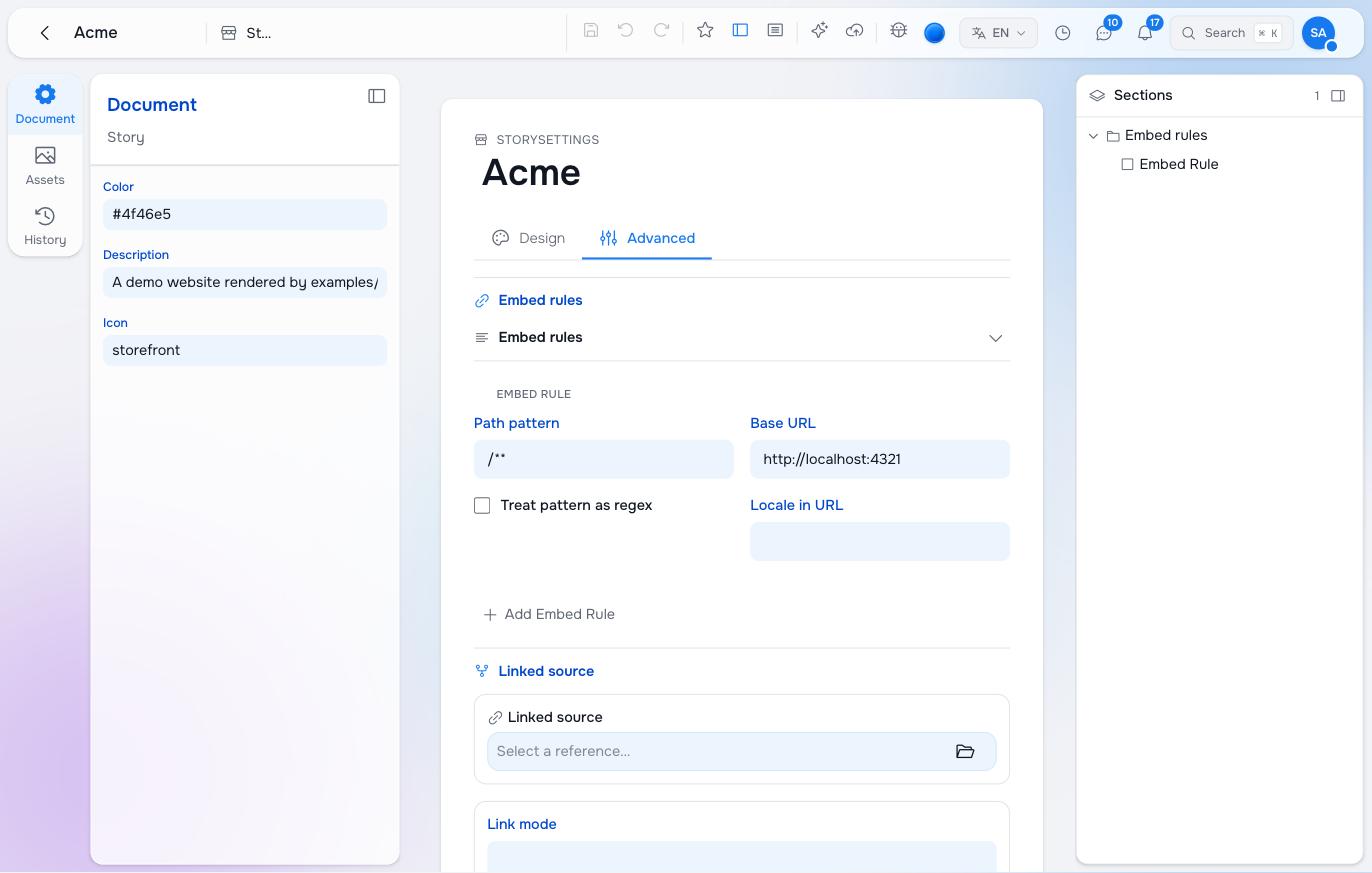
In Studio, open the story’s settings → Advanced → Embed rules and add a rule: pattern /**, base URL where your dev server listens, locale mode prefix. That is what makes a page open in the editor’s preview instead of the plain form. In the package it is the embed_rules entry on the story node, with the base URL as an environment token so nothing is hardcoded:
  domain: "{env:SITE_DOMAIN:-acme.localhost}"
  embed_rules:
    - uuid: embed-default
      element_type: studio:EmbedRule
      pattern: /**
      base_url: "{env:PREVIEW_SERVER:-http://localhost:4321}"
      locale_mode: prefix
Locally the default applies. On the tenant you deploy with PREVIEW_SERVER=https://acme.example SITE_DOMAIN=acme.example exported, or -e production to read them from .env.production; Modelling a site has the details, the inline editing page the rules and their traps.
| Framework | Dev server |
|---|---|
| SvelteKit | pnpm dev → http://localhost:5191 |
| React Router | pnpm dev → http://localhost:5196 |
| Astro | pnpm dev → http://localhost:4321 |
10. Run it
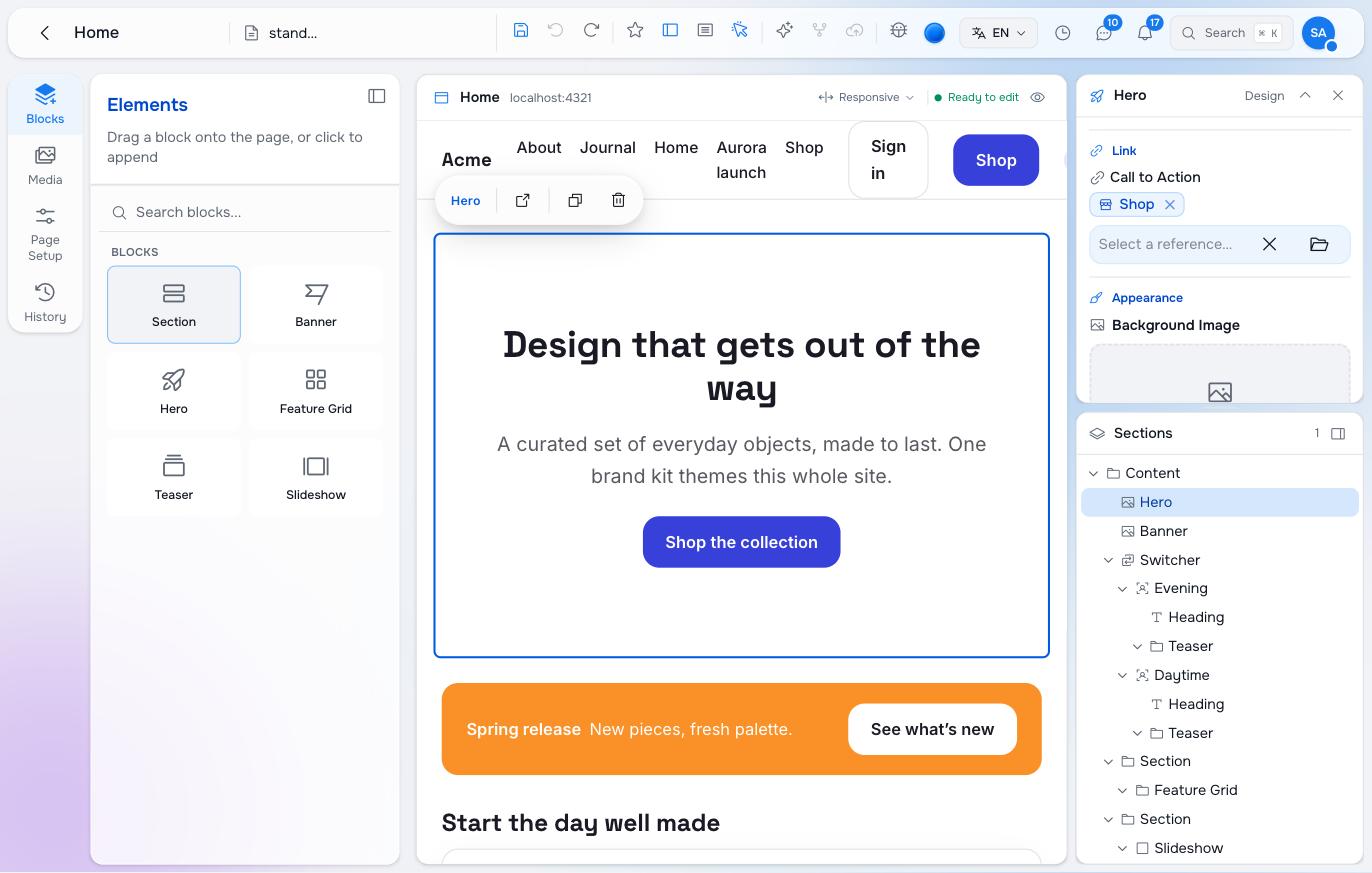
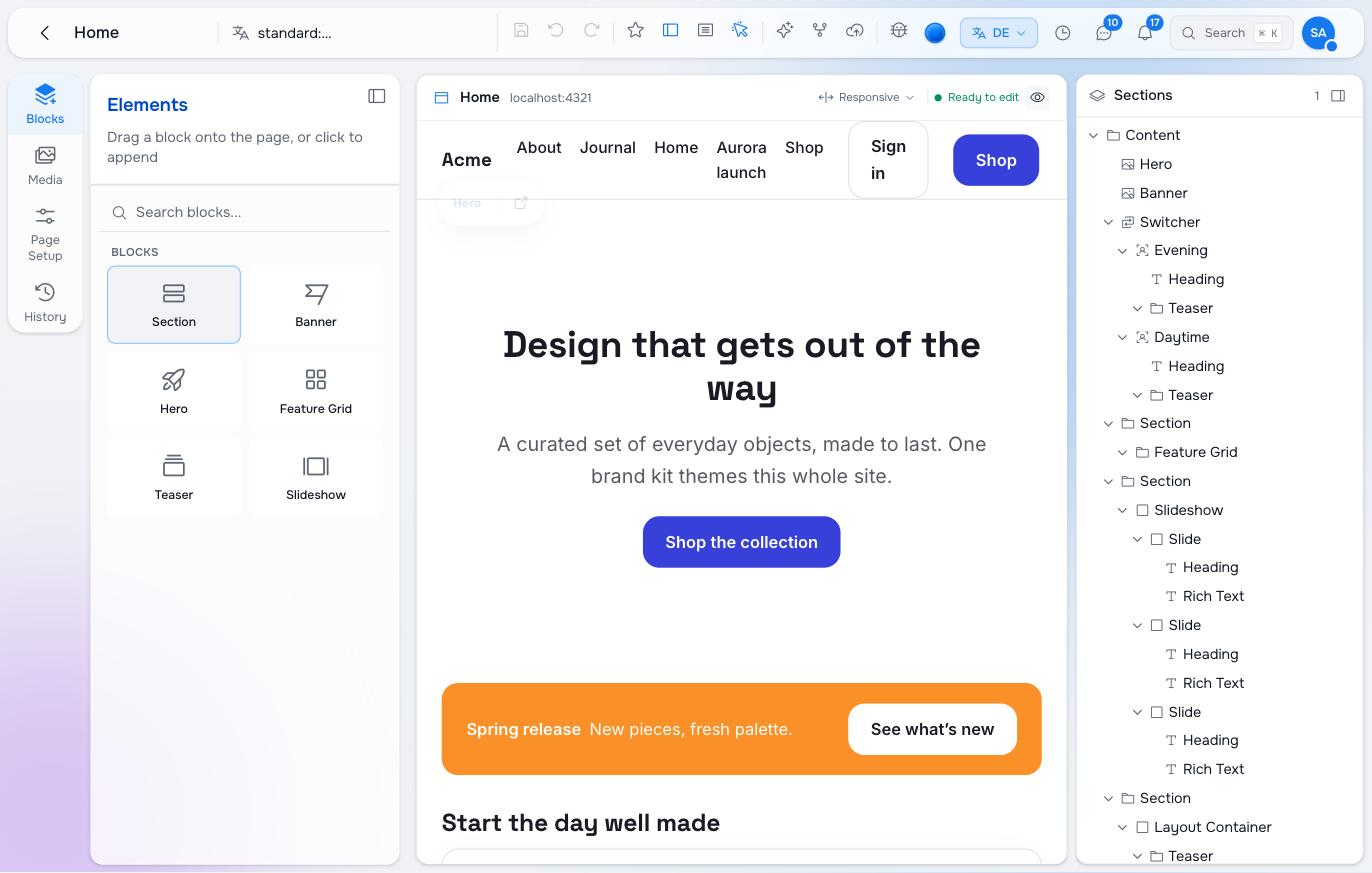
Open the story’s home page in Studio. The preview shows your site, says “Ready to edit”, and a click on the hero selects it. Type into the headline; duplicate a block from its toolbar; drag an image from the Media rail onto the hero; switch the language in the app bar and watch the preview reload in that language.
11. Deploy
On Maravilla Cloud: install the framework’s @maravilla-labs/adapter-*, set the site’s variables with maravilla variable set and maravilla secret set, push. Deploy the content package with PREVIEW_SERVER and SITE_DOMAIN set to the deployed host, so the story’s domain and embed rule point at it. Switch RAISIN_LIVE_BRANCH to publish when the team starts using publishing; until then the live site shows the working branch.
Anywhere else: build, run the server output behind your proxy. The site needs to reach RaisinDB over HTTPS and nothing else.
Pilot documentation. Studio is in a partner pilot. Screens and YAML shown here are current as of the version noted on each page; tell your Maravilla contact when something does not match what you see.