Example: support desk triage
Shipped with Studio, switched off, pointed at the demo desk’s inbox. It is the reference for automations over mounted mail: read a message with its conversation and attachments, file it on the Workplace board, and reply — automatically when routine, otherwise as a draft a person approves.
What it does
- A
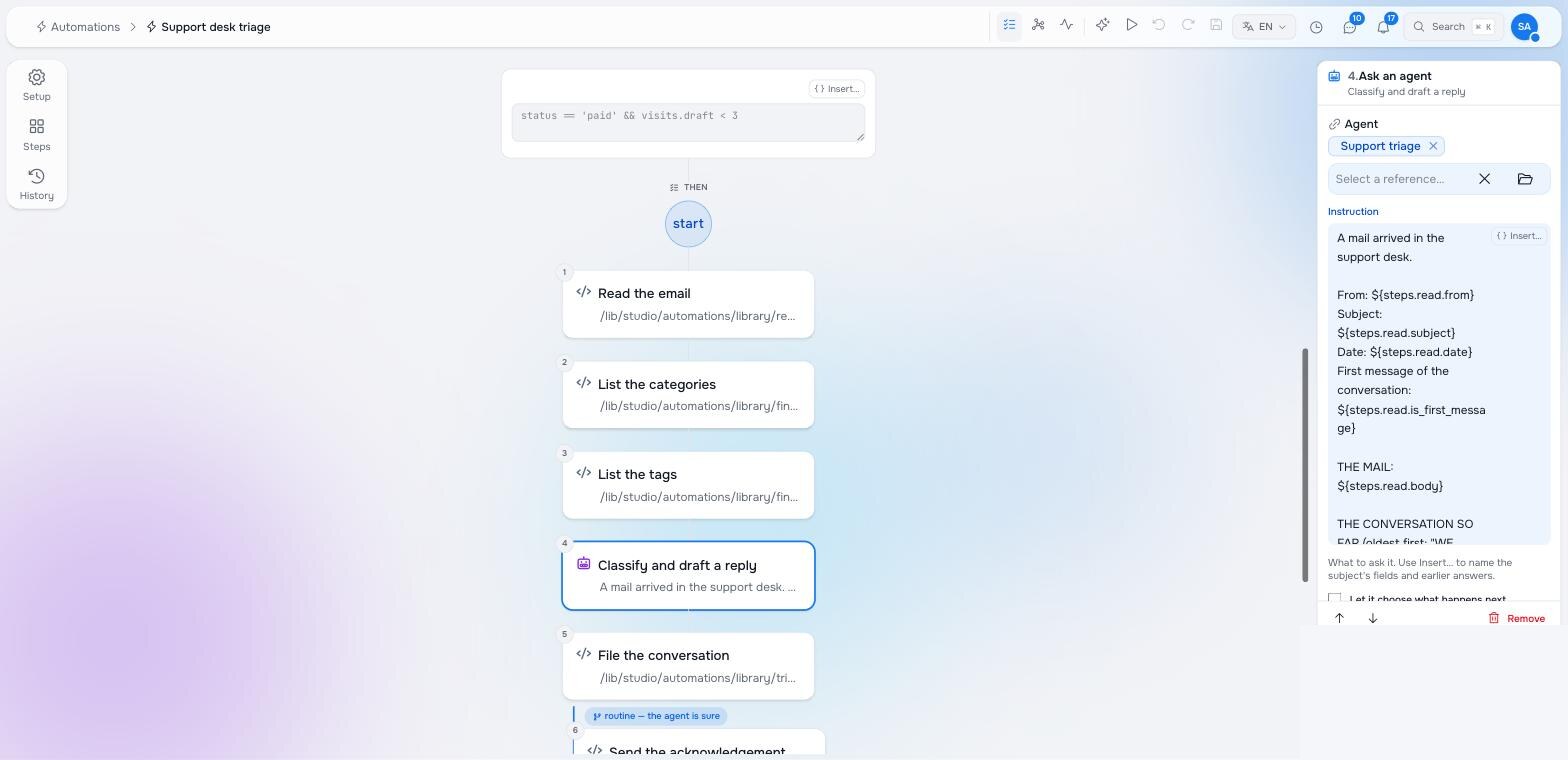
raisin:Mailis created under/support-desk/mail/inbox/**inworkplace— the mount’s next sync landed it. A customer’s reply is a new mail in the same conversation, so it goes through the same automation, with its history. - Read the email — body, every earlier message, attachment text.
- List the categories and List the tags — the desk’s own vocabulary from the taxonomy and tags workspaces, so the agent can only pick what exists.
- Classify and draft a reply — the support triage agent answers a structured question: category path, tag paths, priority, a one-line summary, a suggested reply, and whether the reply is safe to send unread.
- File the conversation — the conversation’s thread on the board gets the category, tags, priority and a note with the summary.
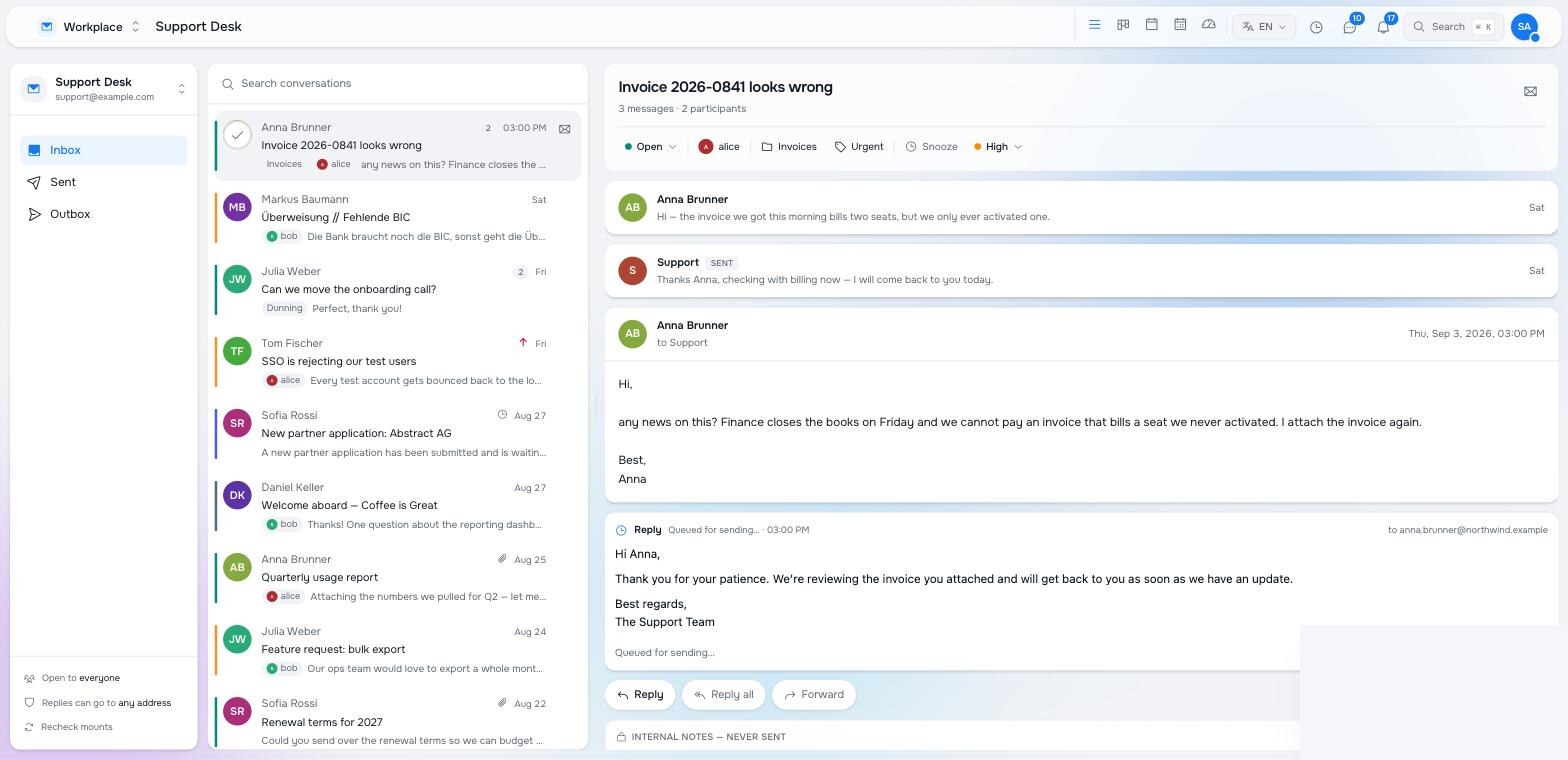
- Routine and the agent is sure → the acknowledgement is sent. Otherwise → the reply is saved as a draft in the outbox → Check the reply asks a person → “Send the reply” queues that draft.
The YAML
content/automations/support-mail-triage/.node.yaml, as shipped. Change the trigger’s path to your mailbox’s inbox and the assignee to your desk.
node_type: studio:Automation
archetype: studio:AutomationPage
properties:
  title: Support desk triage
  enabled: false
  trigger:
    kind: node_event
    workspaces: [workplace]
    node_types: [raisin:Mail]
    event_kinds: [Created]
    paths: ["/support-desk/mail/inbox/**"]
  steps:
    - uuid: read
      element_type: studio:StepFunction
      label: Read the email
      function_ref: { raisin:ref: /lib/studio/automations/library/read-mail, raisin:workspace: functions }
      arguments:
        workspace: ${steps.__subject.workspace}
        path: ${steps.__subject.subject_path}
        include_thread: true
    - uuid: categories
      element_type: studio:StepFunction
      label: List the categories
      function_ref: { raisin:ref: /lib/studio/automations/library/find-nodes, raisin:workspace: functions }
      arguments: { workspace: taxonomy, node_type: studio:Term, under_path: /support, limit: 50 }
    - uuid: tags
      element_type: studio:StepFunction
      label: List the tags
      function_ref: { raisin:ref: /lib/studio/automations/library/find-nodes, raisin:workspace: functions }
      arguments: { workspace: tags, node_type: studio:Tag, limit: 50 }
    - uuid: classify
      element_type: studio:StepAgent
      label: Classify and draft a reply
      agent: { raisin:ref: /agents/support-triage, raisin:workspace: functions }
      instruction: |-
        A mail arrived in the support desk.

        From: ${steps.read.from}
        Subject: ${steps.read.subject}
        Date: ${steps.read.date}
        First message of the conversation: ${steps.read.is_first_message}

        THE MAIL:
        ${steps.read.body}

        THE CONVERSATION SO FAR (oldest first; "WE wrote" is the support team):
        ${steps.read.thread_text}

        ATTACHMENTS (text extracted by the pipeline):
        ${steps.read.attachments_text}

        CATEGORIES you may file under (use the "path"):
        ${steps.categories.listing}

        TAGS you may apply (use the "path"):
        ${steps.tags.listing}
      output_schema:
        type: object
        properties:
          category: { type: string, title: Category path, description: One of the category paths, or empty when none fits. }
          tags: { type: array, title: Tag paths, items: { type: string } }
          priority: { type: string, title: Priority, enum: [low, normal, high, urgent] }
          language: { type: string, title: Language of the mail }
          summary: { type: string, title: One-line summary for the team }
          reply: { type: string, title: Suggested reply }
          auto_reply: { type: boolean, title: Safe to send the reply without a person reading it }
        required: [category, priority, summary, reply, auto_reply]
    - uuid: file
      element_type: studio:StepFunction
      label: File the conversation
      function_ref: { raisin:ref: /lib/studio/automations/library/triage-mail-thread, raisin:workspace: functions }
      arguments:
        workspace: ${steps.__subject.workspace}
        path: ${steps.__subject.subject_path}
        status: open
        category: ${steps.classify.structured_output.category}
        tags: ${steps.classify.structured_output.tags}
        priority: ${steps.classify.structured_output.priority}
        note: |-
          ${steps.classify.structured_output.summary}

          Suggested reply:
          ${steps.classify.structured_output.reply}
        category_root: /support
    - uuid: send_ack
      element_type: studio:StepFunction
      label: Send the acknowledgement
      function_ref: { raisin:ref: /lib/studio/automations/library/reply-to-mail, raisin:workspace: functions }
      arguments:
        workspace: ${steps.__subject.workspace}
        path: ${steps.__subject.subject_path}
        body: ${steps.classify.structured_output.reply}
        send: true
    - uuid: draft
      element_type: studio:StepFunction
      label: Save the reply as a draft
      function_ref: { raisin:ref: /lib/studio/automations/library/reply-to-mail, raisin:workspace: functions }
      arguments:
        workspace: ${steps.__subject.workspace}
        path: ${steps.__subject.subject_path}
        body: ${steps.classify.structured_output.reply}
        send: false
    - uuid: review
      element_type: studio:StepHumanTask
      label: Check the reply
      assignee_mode: specific
      assignee: { raisin:ref: /users/internal/admin-at-studio-local, raisin:workspace: raisin:access_control }
      task_type: approval
      prompt: |-
        “${steps.read.subject}” from ${steps.read.from}
        — filed under ${steps.file.category_label} (${steps.file.priority}).

        ${steps.classify.structured_output.summary}

        Suggested reply (saved as a draft in the outbox):

        ${steps.classify.structured_output.reply}

        Send it as it is, or leave the draft for someone to edit in Workplace.
      options:
        - { label: Send the reply, value: send }
        - { label: Leave the draft, value: keep }
      due_in_hours: 24
    - uuid: send_reviewed
      element_type: studio:StepFunction
      label: Send the reply
      function_ref: { raisin:ref: /lib/studio/automations/library/reply-to-mail, raisin:workspace: functions }
      arguments:
        workspace: ${steps.__subject.workspace}
        path: ${steps.__subject.subject_path}
        outbound_path: ${steps.draft.outbound_path}
        send: true
  edges:
    - { id: e_read, source: read, target: categories, kind: next }
    - { id: e_cats, source: categories, target: tags, kind: next }
    - { id: e_tags, source: tags, target: classify, kind: next }
    - { id: e_classified, source: classify, target: file, kind: next }
    - { id: e_routine, source: file, target: send_ack, kind: condition, condition: "steps.classify.structured_output.auto_reply == true", label: routine — the agent is sure }
    - { id: e_check, source: file, target: draft, kind: next, label: otherwise }
    - { id: e_drafted, source: draft, target: review, kind: next }
    - { id: e_send, source: review, target: send_reviewed, kind: condition, condition: "steps.review.action == 'send'", label: send it }
  entries: [read]
  exits: [send_ack, review, send_reviewed]
The agent
# content/functions/agents/support-triage/.node.yaml
node_type: raisin:AIAgent
properties:
  title: Support triage
  provider: maravilla
  model: llama-3.3-70b-full
  temperature: 0.2
  max_tokens: 2048
  execution_context: system
  thinking_enabled: false
  system_prompt: |-
    You triage a shared support mailbox for a small software company. You are
    given one incoming email, everything said earlier in the same
    conversation, the text of its attachments, and the desk's own list of
    CATEGORIES and TAGS.

    Rules:
    - Pick the category from the list you are given, by its path. Never invent
      one. If nothing fits, leave it empty and say so in the summary.
    - Tags only from the list, and only when clearly warranted.
    - Priority: urgent = production down or money wrongly taken; high = a
      blocked customer or a deadline this week; normal = everything else;
      low = newsletters, notifications, vendors selling something.
    - The summary is ONE sentence for a colleague who has not read the mail.
    - The reply is written in the customer's language, short, polite, from
      "the Support team", and commits to nothing you cannot know.
    - auto_reply is true ONLY for a routine first acknowledgement of a clear,
      non-urgent request — never for complaints about money, anything angry,
      anything legal, or a follow-up to an earlier answer. When in doubt,
      false: a person will read your draft first.
Things to notice
- The agent judges; the steps act. It never writes a node or sends a mail itself. Everything it decided is on the thread node and in the run, which is what makes the run auditable.
- A reply is read in context. Read the email returns the whole conversation, so a follow-up (“any news on this?”) is classified with the earlier exchange in view — and the agent’s own rule says a follow-up is never auto-answered.
- Drafts are nodes. The draft is an outbound mail in the mailbox’s outbox; the person sees it in the Inbox task and inline in the Workplace conversation, where they can also edit it before sending. Approval queues that draft, not a copy.
- The vocabulary comes from content. Categories are a taxonomy tree, tags a workspace; both are read at run time, and the filing step reports anything the agent named that does not exist.
Variations
- Tools instead of lookups. Turn on let it work a tool loop on the classify step and give the agent
find-nodesandread-mailas tools; the two lookup steps go away and the agent can also look at the customer’s earlier threads. Costs a few more model calls per mail. - Wait for attachments. The asset pipeline extracts text seconds after the sync. If a case must have it, add an if on
steps.read.pending_attachments == 0and a Wait step on the otherwise arm looping back, bounded withvisits.read < 5. - Assign by category. Add
assigneeto File the conversation from a small map, or let the agent return it from a list of the desk’s members.
Pilot documentation. Studio is in a partner pilot. Screens and YAML shown here are current as of the version noted on each page; tell your Maravilla contact when something does not match what you see.