Forms, submissions and follow-up
The most common first automation for a website: a visitor sends a form, and something happens. In Studio that is three things you already know, put together — a form block that stores a node, an app that shows those nodes, and an automation that reacts to them.
1. The form stores a node
A form is content: a form fragment in the Content Hub made of the standard form blocks, placed on any page. Its frame decides what a submission does. With action: store every entry becomes a node in the workspace you name.
# content/contenthub/contact-form/.node.yaml
node_type: studio:ContentFragment
archetype: studio:ContentFragmentPage
properties:
  title: Contact form
  kind: form
  status: approved
  content:
    - uuid: cf-frame
      element_type: standard:FormFrame
      action: store
      store_workspace: submissions
      success_message: Thank you — we have your message and will come back to you.
      error_message: That did not go through. Please try again, or write to us directly.
      fields:
        - uuid: cf-row-who
          element_type: standard:FormRow
          columns: "2"
          fields:
            - { uuid: cf-name, element_type: standard:FormTextInput, label: Name, name: name, input_type: text, required: true }
            - { uuid: cf-email, element_type: standard:FormTextInput, label: Email, name: email, input_type: email, required: true }
        - uuid: cf-topic
          element_type: standard:FormChoiceInput
          label: What is it about?
          name: topic
          control: dropdown
          options:
            - { uuid: cf-t-quote, label: A quote }
            - { uuid: cf-t-support, label: Support }
            - { uuid: cf-t-partner, label: Becoming a partner }
        - { uuid: cf-message, element_type: standard:FormTextInput, label: Message, name: message, input_type: textarea, rows: 5, required: true }
The renderer posts the entry and the platform writes one node per submission: the indexed columns your node type declares (who, when, which form, status) as real properties, and every answer under payload.
2. The app shows them
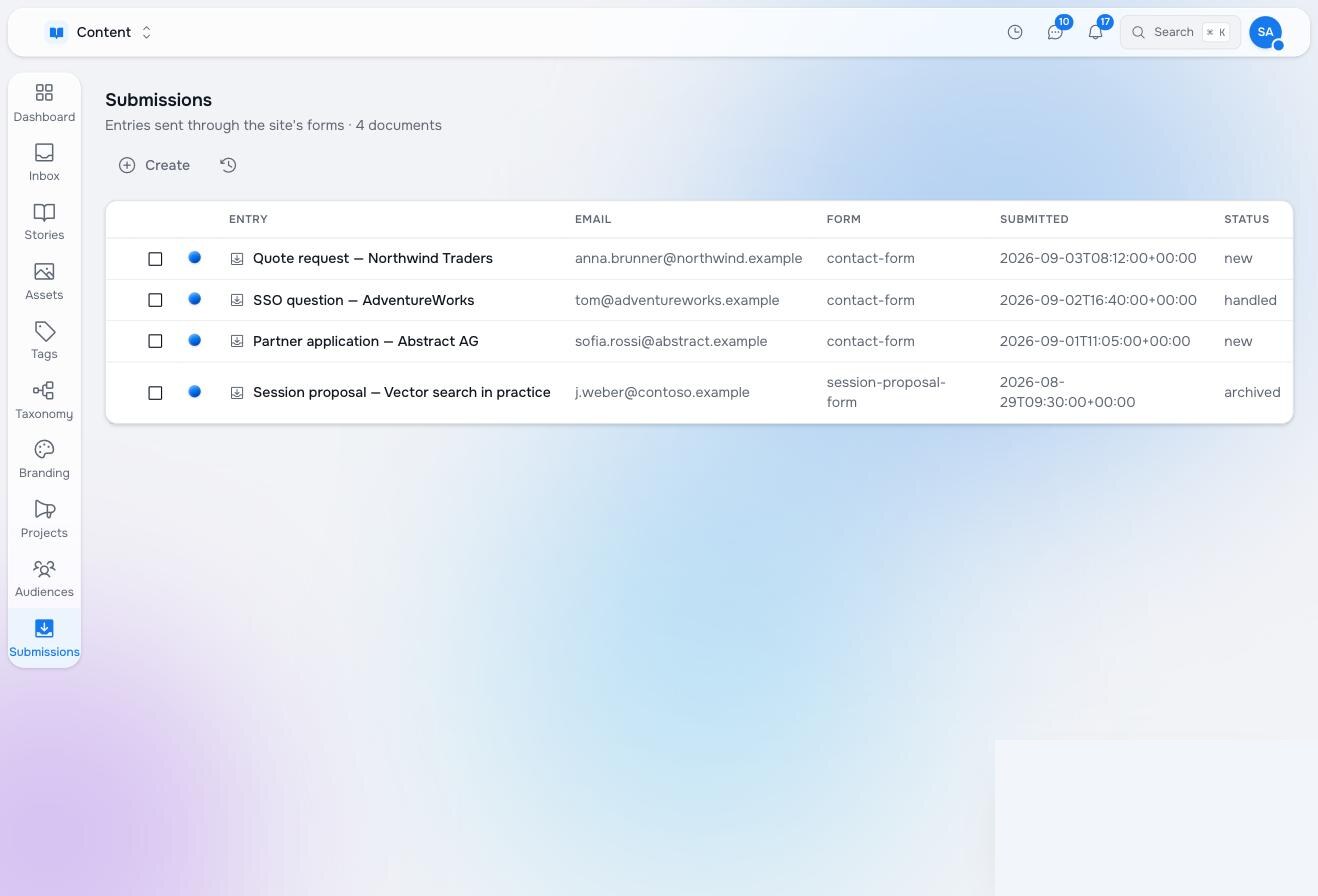
The node type, the workspace and the application definition from Your own app — a acme:FormSubmission with title, form, email, submitted_at, status (new by default) and payload, in a submissions workspace, with a table that lists them. Nothing else. Someone opening Studio sees a Submissions entry in the nav and a table of entries with their status.
3. The automation follows up
Now the part this documentation is about. On every new submission: acknowledge the sender, let an agent read it and decide where it belongs, and put a task with a suggested answer in the right person’s Inbox.
# content/automations/contact-follow-up/.node.yaml
node_type: studio:Automation
archetype: studio:AutomationPage
properties:
  title: Contact follow-up
  description: Acknowledge every website contact, route it, and ask the owner to answer.
  enabled: false
  trigger:
    kind: node_event
    workspaces: [submissions]
    node_types: [acme:FormSubmission]
    event_kinds: [Created]
    property_filters:
      form: contact-form            # only this form's entries
    ignore_automation_writes: true  # the status write below must not re-trigger
  steps:
    - uuid: ack
      element_type: studio:StepFunction
      label: Acknowledge the sender
      function_ref: { raisin:ref: /lib/studio/automations/library/send-email, raisin:workspace: functions }
      arguments:
        to: ${steps.__subject.subject.email}
        subject: "We received your message"
        body: |-
          Thank you for getting in touch. We have your message about
          "${steps.__subject.subject.payload.topic}" and will come back to you
          within one working day.
    - uuid: route
      element_type: studio:StepAgent
      label: Read it and decide who answers
      agent: { raisin:ref: /agents/front-desk, raisin:workspace: functions }
      decide: true
      min_confidence: 0.6
      instruction: |-
        A message arrived through the website's contact form.

        From: ${steps.__subject.subject.email}
        Topic they chose: ${steps.__subject.subject.payload.topic}
        Message:
        ${steps.__subject.subject.payload.message}

        Decide who should answer it. If it is clearly spam or an advertisement,
        choose the branch that archives it.
    - uuid: sales
      element_type: studio:StepHumanTask
      label: Ask sales to answer
      assignee_mode: specific
      assignee: { raisin:ref: /users/internal/sales, raisin:workspace: raisin:access_control }
      task_type: action
      prompt: |-
        A website contact needs an answer.

        ${steps.__subject.subject.email} wrote about "${steps.__subject.subject.payload.topic}":

        ${steps.__subject.subject.payload.message}

        Why it is yours: ${steps.route.reasoning}
      options:
        - { label: Answered, value: done }
      due_in_hours: 24
    - uuid: support
      element_type: studio:StepHumanTask
      label: Ask support to answer
      assignee_mode: specific
      assignee: { raisin:ref: /users/internal/support, raisin:workspace: raisin:access_control }
      task_type: action
      prompt: |-
        A website contact needs an answer.

        ${steps.__subject.subject.email} wrote:

        ${steps.__subject.subject.payload.message}
      options:
        - { label: Answered, value: done }
      due_in_hours: 24
    - uuid: mark_handled
      element_type: studio:StepFunction
      label: Mark it handled
      function_ref: { raisin:ref: /lib/studio/automations/library/update-node, raisin:workspace: functions }
      arguments:
        properties: { status: handled }      # workspace and path default to the subject
    - uuid: archive
      element_type: studio:StepFunction
      label: Archive it
      function_ref: { raisin:ref: /lib/studio/automations/library/update-node, raisin:workspace: functions }
      arguments:
        properties: { status: archived }
  edges:
    - { id: e_ack, source: ack, target: route, kind: next }
    - { id: e_sales, source: route, target: sales, kind: condition, label: "A sales question — pricing, a quote, a partnership" }
    - { id: e_support, source: route, target: support, kind: condition, label: "A support question from an existing customer" }
    - { id: e_spam, source: route, target: archive, kind: condition, label: "Spam or an advertisement — nobody needs to answer" }
    - { id: e_unsure, source: route, target: support, kind: next, label: "not sure — support looks first" }
    - { id: e_sales_done, source: sales, target: mark_handled, kind: next }
    - { id: e_support_done, source: support, target: mark_handled, kind: next }
  entries: [ack]
  exits: [mark_handled, archive, sales, support]
What each part does:
- The trigger watches the
submissionsworkspace for a createdacme:FormSubmissionwhoseformis the contact form. The property filter is matched before any run exists, so a second form on the site does not start this automation. - Acknowledge sends a plain email from the platform to the address the visitor typed. It uses the answers by name:
payload.topic, because the node type stores answers underpayload. - Route is an agent that chooses one of three labelled branches; below the minimum confidence it takes the plain connection, which sends the message to support to look at first.
- Ask sales / support are Inbox tasks with the message and the agent’s reasoning. The run waits for “Answered”.
- Mark it handled and Archive it write
statusback on the submission, which is what the app’s table shows.ignore_automation_writeskeeps that write from starting another run.
Variations
- Draft the answer. Give the agent What it must return with a
replyfield and put the suggested reply in the task, as the support desk example does. - Send with approval. Add a Reply step after the task, gated on the task’s choice, that sends the drafted answer from the platform — or from a mailbox through Workplace if the desk lives there.
- Create a record instead. Replace the tasks with Create a node in a CRM workspace of your own, or with your own function that opens a ticket in the helpdesk you already use.
- A different form, a different flow. Trigger on
form: session-proposal-formwith its own steps. One workspace of submissions, one automation per form.
Pilot documentation. Studio is in a partner pilot. Screens and YAML shown here are current as of the version noted on each page; tell your Maravilla contact when something does not match what you see.