Workplace
Workplace is the shared inbox in Studio. A mailbox points at a connected account — a Microsoft 365 or IMAP mount — and the team works its conversations together: status, owner, category, tags, priority, notes, replies. Every message is a node, so everything an automation can do with a node it can do with mail. Connecting the account is one click in the admin console; the Microsoft 365 bundle mounts the inbox, the sent folder and an outbox that sends.
The model
- A message is a
raisin:Mailthe mount owns. Studio reads it; the only things written back are read/unread state and importance. - A conversation is every message sharing a provider conversation id, across the inbox and sent folders.
- The team’s state for a conversation — status, assignee, category, tags, priority, due date, snooze, notes, board position — lives on a
studio:MailThreadbeside the mailbox. It is created the first time someone (or an automation) triages the conversation; a conversation without one is simply open, unassigned, untagged. - A draft or a send is a
raisin:OutboundMailin the mailbox’s outbox. Creating one does nothing; setting it to queued is the send. The provider threads and quotes it.
Views
The app bar switches between List (conversations with a docked reader), Board, Calendar (due and snoozed conversations on dates), Schedule and Pressure (who has been waiting longest against the desk’s response target). Which views a mailbox offers, and which opens first, is content — see Permissions below.
The board
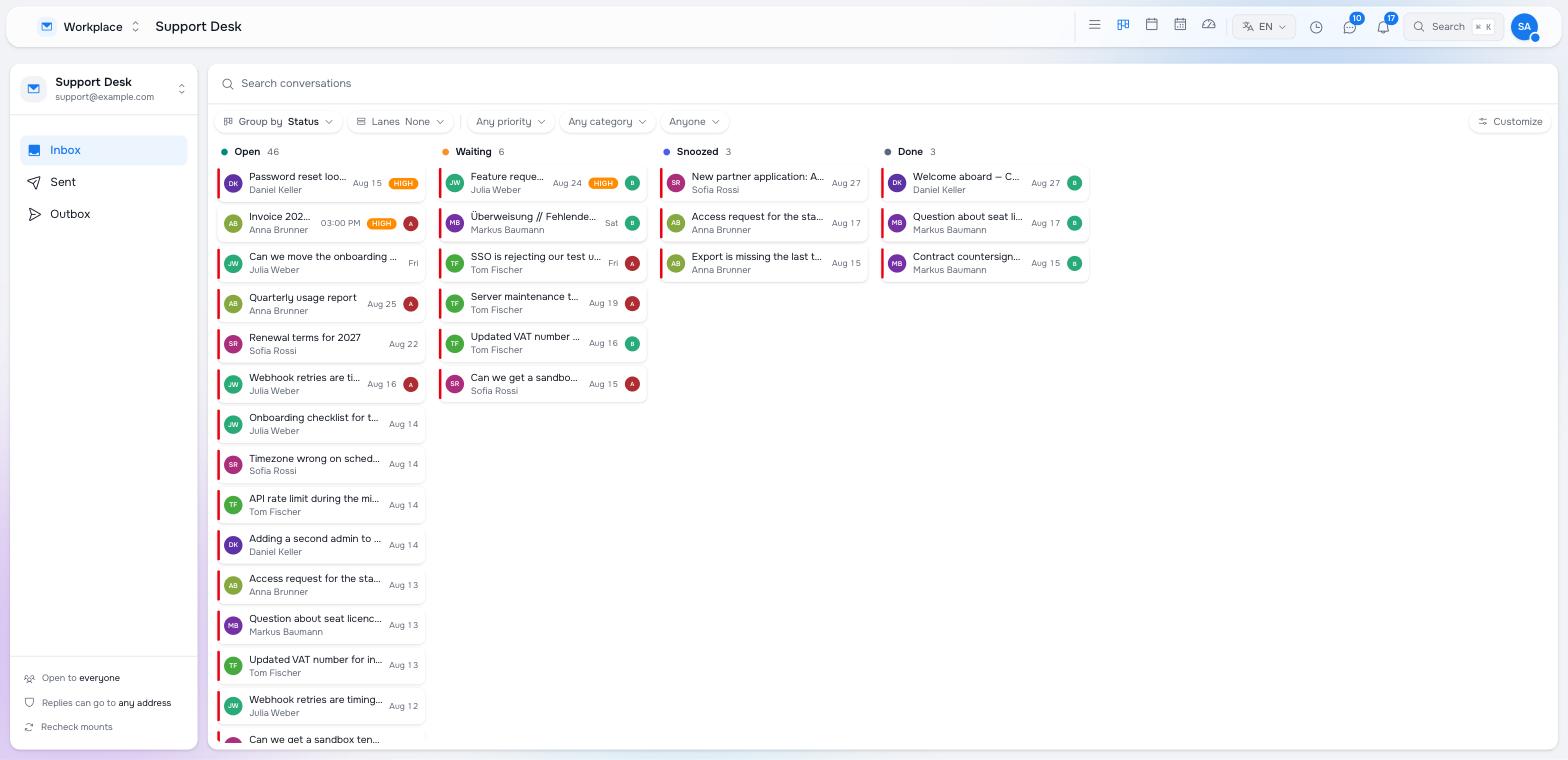
Group by chooses the columns: Status (the mailbox’s own set, draggable), Category, Assignee or Priority (draggable). Lanes adds a second axis across the board — status columns with a lane per priority, or per assignee — so one board answers two questions at once. A card sits where its column and its lane meet, and dropping it into another cell changes both in one write.
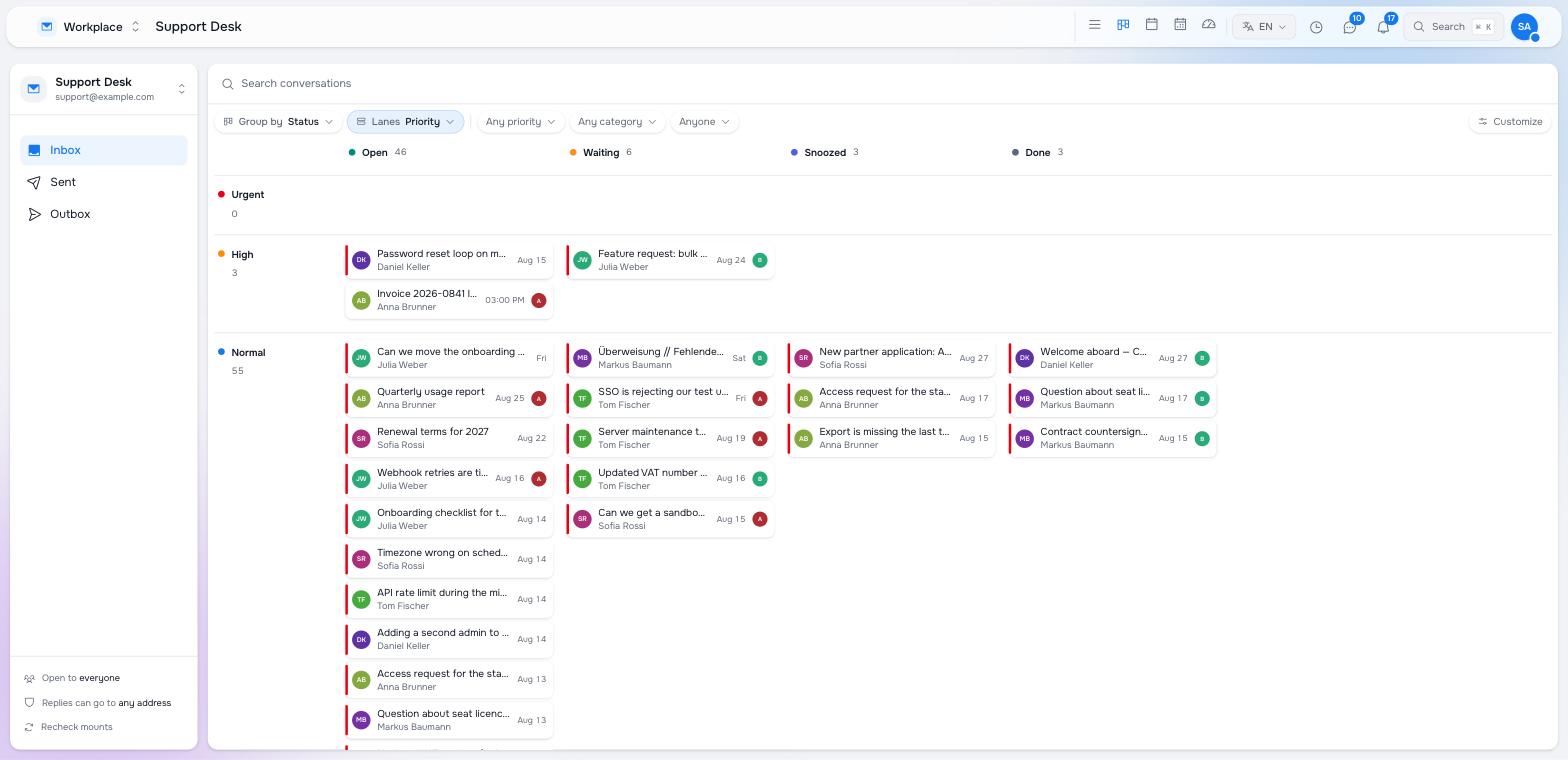
The filter pills narrow every grouping by priority, category and assignee. Cards can be ordered by hand inside a column: the position is stored on the thread, so it survives reloads and everyone on the desk sees the same order. Customize opens the mailbox settings — columns, default grouping, response target, allowed recipient domains — from the board itself.
Group-by and lane choices are remembered per mailbox in your browser; the mailbox’s own default is what a new reader sees.
The reader
A conversation opens as a stack: the header with the triage bar (status, assignee, category, tags, snooze, priority), then every message oldest first, then anything on its way out, then reply actions and internal notes.
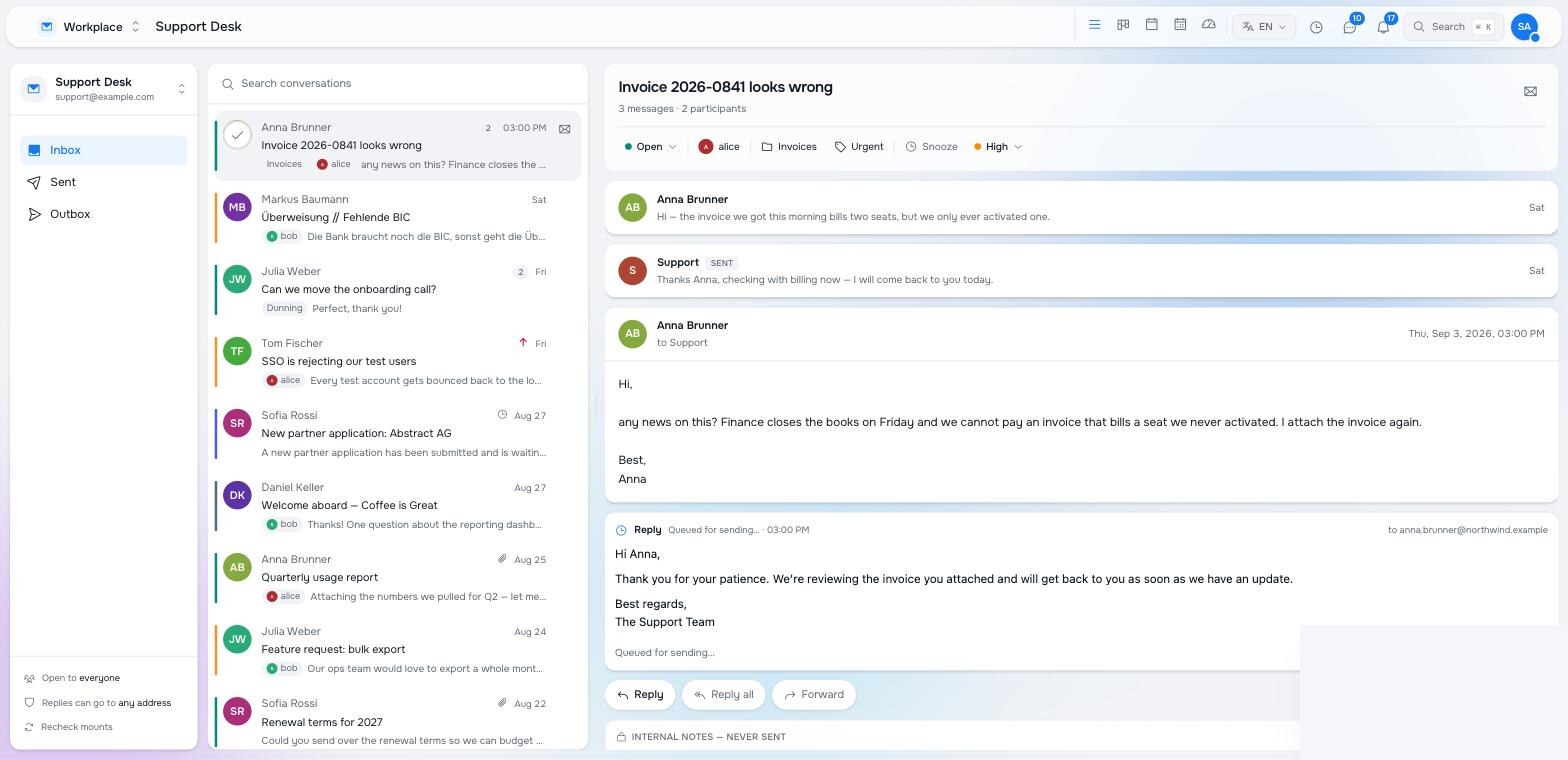
Drafts and sends inline. Anything in the outbox that answers this conversation is shown under the messages: a draft an automation suggested, with Send, Edit and Discard; a queued or sending reply with its status; a failed one with Try again. Edit opens the composer on that draft and sends the same node, so there is never a second copy. A send whose outcome is genuinely unknown is never retried automatically — a person checks the account’s sent items first.
Notes are internal and never sent. Reply, Reply all and Forward compose against the latest message, so the provider threads the answer where the recipient expects it.
What automations add
Three library steps make mail a first-class subject for automations:
| Step | Gives you |
|---|---|
| Read an email | The body as text, the whole conversation before it, the attachment text the asset pipeline extracted, and whether the customer is waiting on you. |
| Triage a conversation | The board’s state written from a run: status, category, tags, priority, assignee, a note. |
| Reply to an email | A draft in the outbox for a person, or a queued send. |
The support desk triage example is the shape to copy: read in context, classify, file, draft, ask, send. Because a customer’s reply is a new message in the same conversation, the same automation handles follow-ups with the earlier exchange in view.
Trigger on raisin:Mail Created under your mailbox’s inbox path with /**. Attachments arrive as raisin:Asset children of the message and their text follows seconds later from the asset pipeline; Read an email reports how many are still pending.
Two more shapes worth having, both ordinary automations:
- When the board runs hot. A schedule every fifteen minutes, Find nodes for conversations still Open with no reply for longer than your promise, and a task to the on-call person when the count crosses a line — the heat you see on the cards, turned into a page before a customer notices.
- When money is involved. A refund request classified by the triage step can create the refund itself: a gate for a person, then
refund-order, which writes a queued refund into the Stripe mount and lets the payment loop settle it. The conversation closes when the refund node reports success.
Permissions
Workplace’s views and actions are children of its application definition, so row-level security decides what each role is offered — no permission check lives in the interface:
| Node | Hides |
|---|---|
views/board, views/pressure, … | The corresponding view for a role that cannot read it. |
actions/board-move | Dragging between columns and lanes. |
actions/board-reorder | Hand ordering within a column. |
actions/board-customize | The Customize button. |
actions/set-priority | The priority menu in the reader. |
The board view’s configuration also lists which groupings the switch offers and the default. An installation adds or narrows these under /apps/local/appdefs/workplace; a package that ships a desk for a client does the same in its own tree.
Pilot documentation. Studio is in a partner pilot. Screens and YAML shown here are current as of the version noted on each page; tell your Maravilla contact when something does not match what you see.