Your own app
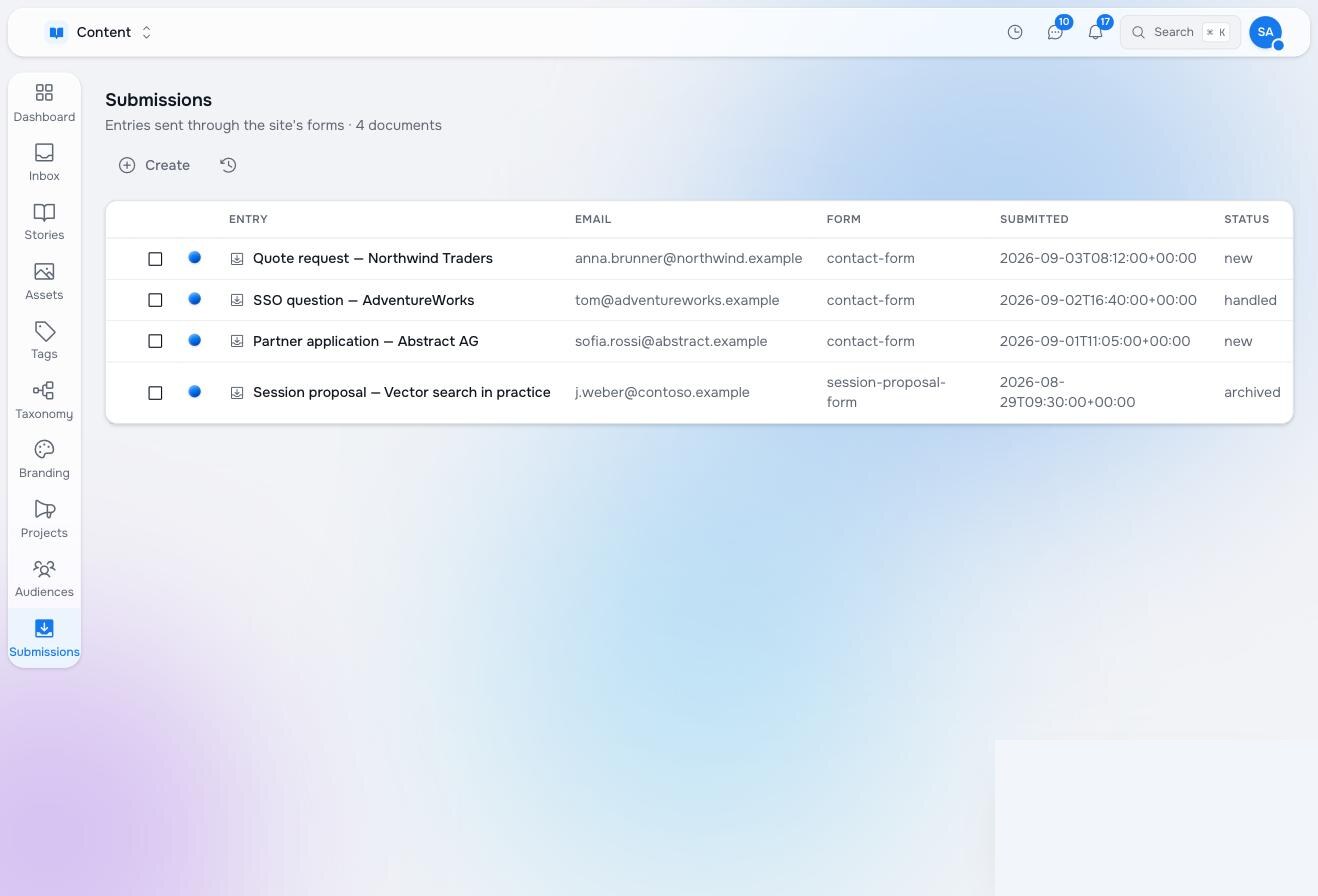
A Studio app is a workspace plus an application definition: a studio:AppDef node that gives the workspace a nav entry, a table with columns, views, the actions people may take, and what they may create. Studio synthesises the browser from it. For most record-keeping apps — submissions, requests, registrations, a small CRM — that is the whole app, with zero source code.
The three files
A node type for the record — what is indexed is what the table can show and what a trigger can filter on:
# nodetypes/form-submission.yaml
name: acme:FormSubmission
title: Form submission
properties:
  - { name: title, type: String, required: true, index: [Fulltext] }
  - { name: form, type: String, index: [Property] }
  - { name: email, type: String, index: [Fulltext] }
  - { name: submitted_at, type: String, index: [Property] }
  - { name: status, type: String, default: new, index: [Property] }
  - { name: payload, type: Object }
A workspace that allows it:
# workspaces/submissions.yaml
name: submissions
title: Submissions
allowed_node_types: [studio:Folder, acme:FormSubmission]
allowed_root_node_types: [studio:Folder, acme:FormSubmission]
An application definition, with its views, actions and create rules as child nodes:
content/apps/local/appdefs/submissions/
├── .node.yaml                  studio:AppDef
├── views/.node.yaml            studio:Folder
├── views/list/.node.yaml       studio:AppView   { key: list, default: true }
├── actions/.node.yaml          studio:Folder
├── actions/edit/.node.yaml     studio:AppAction { key: edit }
├── actions/delete/.node.yaml   studio:AppAction { key: delete }
└── create/root/.node.yaml      studio:AppCreateRule { pattern: "**", archetypes: [acme:FormSubmissionPage] }
# content/apps/local/appdefs/submissions/.node.yaml
node_type: studio:AppDef
archetype: studio:AppDef
properties:
title: Submissions
workspace: submissions
icon: tray-arrow-down
color: "#104f5d"
domain: { uuid: submissions-domain, element_type: studio:AppDomain, id: content }
section:
uuid: submissions-section
element_type: studio:AppSection
label: Submissions
icon: tray-arrow-down
description: Entries sent through the site's forms
order: 95
browser:
root: "/"
containerTypes: [studio:Folder]
listColumns:
- { id: state, header: "", render: status, width: "2.5rem" }
- { id: name, header: Entry, render: title }
- { id: email, header: Email, field: email, render: property }
- { id: form, header: Form, field: form, render: property }
- { id: sent, header: Submitted, field: submitted_at, render: property }
- { id: handled, header: Status, field: status, render: property }
emptyTitle: No submissions yet
emptyDescription: Entries sent through the site's forms land here.Creating the AppDef also grants the app’s role access to the workspace, so nobody adds a permission by hand.
Why the lists are nodes
Views, actions and create rules are child nodes rather than keys in the JSON for one reason: row-level security can hide a node and cannot hide a key. A role that may not read actions/delete has no Delete button, with no permission check in any component. The grouping folder’s readability is the switch: a readable folder with no readable members means none of these; an absent folder means not managed here and everything is offered. Grant with globs such as /**/actions/delete per role.
Action keys name behaviours Studio implements — edit, rename, favorite, add, copy, cut, paste, move, variations, publish, unpublish, delete — so an action node chooses what appears, in what order, for whom. A view adds a board with its own config (column field, columns, transition rules), a grid, an overview. Workplace is the reference for a bespoke app hung on the same switch: its views/* and actions/board-* nodes are what its board obeys.
Where it lives, and who owns it
Studio’s own apps ship under /apps/libs/appdefs/** and are refreshed on every update. Yours ship under /apps/local/appdefs/**, which an update never touches. Ship the two parent folders (/apps/local, /apps/local/appdefs) as create-if-missing, and claim only your subtree:
# .raisin-sync.yaml
defaults: { mode: skip }
filters:
  - { root: /apps/local/appdefs/submissions, mode: replace }
Verify
raisindb package create --check ./raisin-package
raisindb deploy ./raisin-package --repo <repo> --install
then read the tree back rather than trusting the deploy output:
SELECT path FROM apps WHERE path LIKE '/local/appdefs/%' ORDER BY path;Records and automations
An app’s records are nodes, so everything on the Automations pages applies: trigger on acme:FormSubmission Created in submissions, read its fields by name, route with an agent, ask a person, write status back. The forms chapter puts the three together.
Pilot documentation. Studio is in a partner pilot. Screens and YAML shown here are current as of the version noted on each page; tell your Maravilla contact when something does not match what you see.