Personalisation
Studio has two levels of “different visitors see different things”, both authored in the editor and both decided at render time by your renderer with @maravilla/studio-content. Neither needs code per campaign:
- a Switcher holds several versions of a part of a page, each a full set of blocks with a rule;
- a page variation keeps several complete versions of a whole page behind one URL.
What decides which version a visitor gets is a rule. Rules are built with the rule builder, can use reusable segments, and can be checked against personas before anything goes live.
Rules
A rule is a set of conditions in a group that reads All of or Any of. Groups nest (“Germany AND (mobile OR signed in)”) and can be turned around with NOT. Each condition is three choices — what you ask about, how you compare, and the value — and the value control fits the question: countries with presets such as DACH, EU or Nordics, weekday chips, an hour range, segments, or the values of a trait you declared.
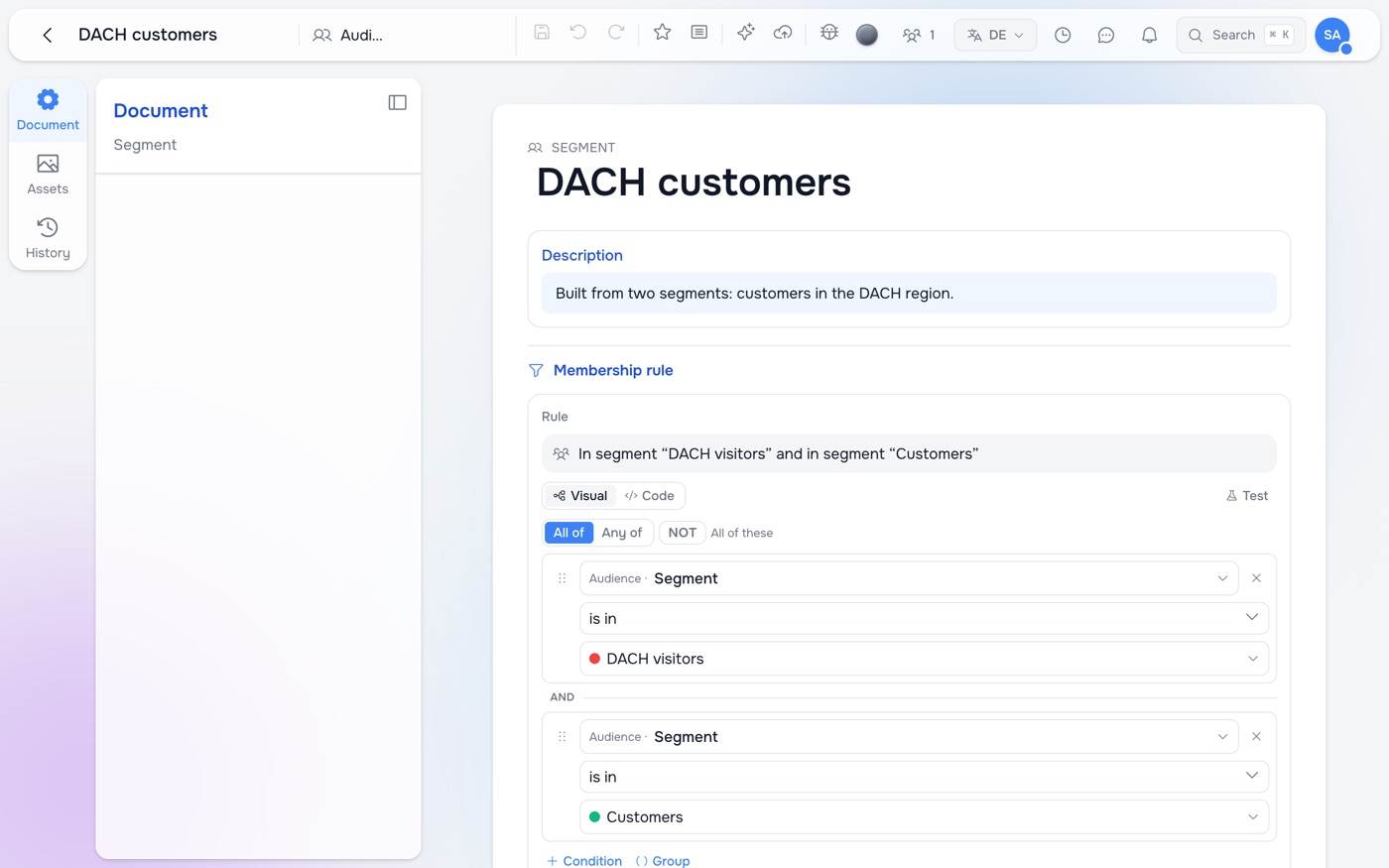
Test shows whether the rule matches for a persona of your choice, with ✓ or ✗ on every condition, so “why doesn’t my variant show?” has an answer on screen.
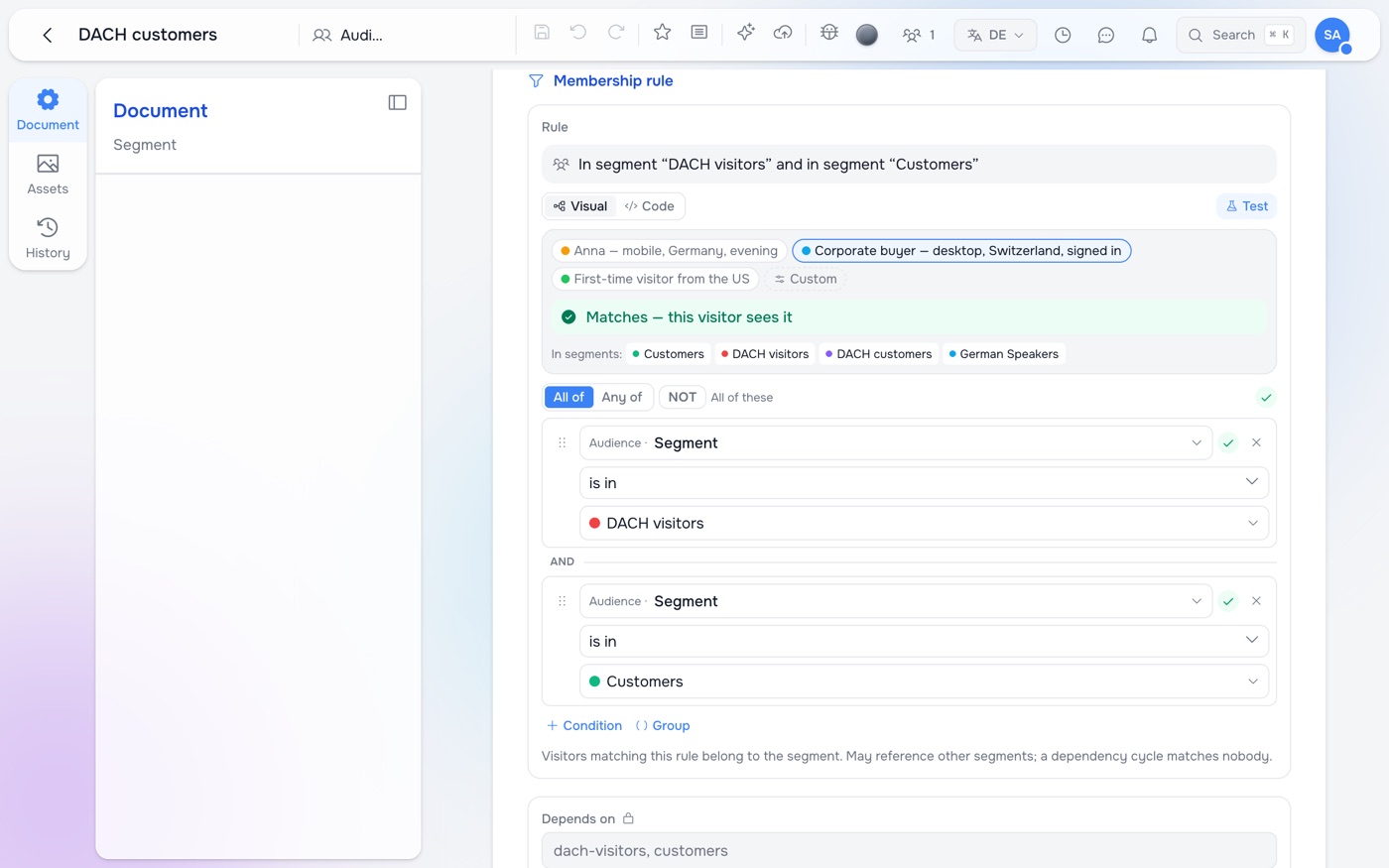
Code shows the same rule as text. It is REL, the expression language the rest of the platform uses for permissions and automations, so a rule means the same thing in the browser, on the server, at the edge and in email:
['DE', 'AT', 'CH'].contains(geo.country) && device.type == 'mobile'
segments.contains('customers') && !segments.contains('churned')
time.hour != null && time.hour >= 18 || utm.campaign == 'autumn'
Anything the visual view cannot draw stays exactly as written. Two things worth knowing if you write rules by hand: comparisons are exact (countries are upper-case ISO codes), and an error anywhere makes the whole rule not match — so a comparison on a value that may be unknown is written with a guard, time.hour != null && time.hour >= 18. The builder writes the guard for you.
What a rule can ask about
| where it comes from | known | |
|---|---|---|
geo.country, geo.region | the visitor’s network address, set by the platform edge | on the server and in the browser |
device.type, device.os | the browser | on the server and in the browser |
locale | the page | everywhere |
referrer.host, utm.*, query.* | the link the visitor followed | everywhere |
time.hour, time.weekday, time.date | the visitor’s own clock | in the browser |
user.authenticated, user.roles | your site or application | on the server and in the browser |
traits.* | your site or application (declared in Studio) | on the server and in the browser |
segments | the segments the visitor belongs to | — |
The builder warns when a condition cannot work where it is used — a time-of-day condition on a whole-page variation, for example, which is decided before the browser’s clock is known.
Segments, traits and personas
The Personalization app holds the reusable pieces.
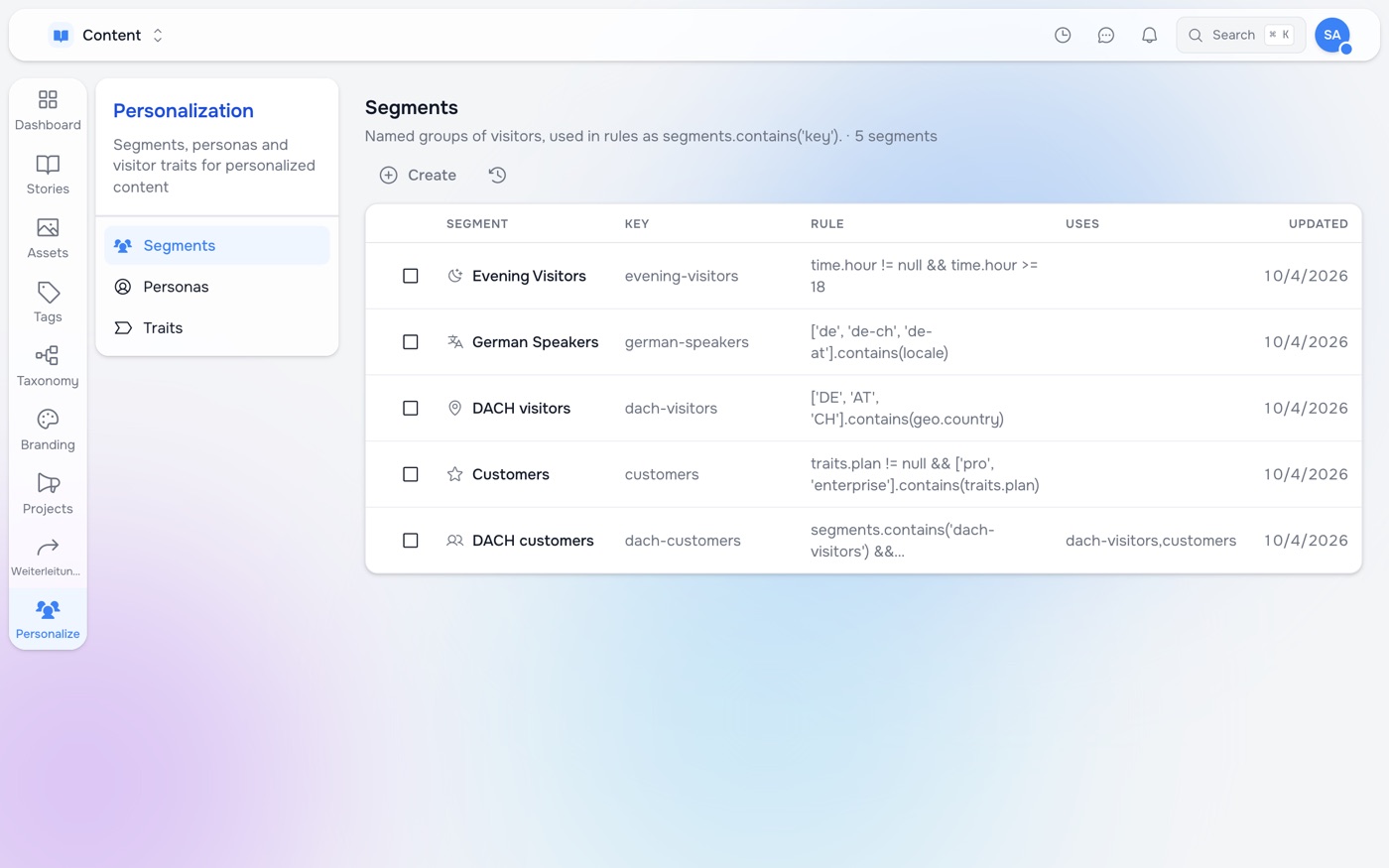
Segments define a group of visitors once — “DACH visitors”, “Customers”, “Evening visitors” — and a rule then says Segment is in Customers. A visitor can be in several. A segment may be built from others (“DACH customers” is in DACH visitors and in Customers; “Prospects” is NOT in Customers); they are resolved in order, and a circular definition matches nobody and is flagged. Every segment has a key that rules use, so it can be renamed freely.
Traits are facts about a visitor that Studio cannot see by itself — a plan, interests, the campaign that first brought them. Declare one with its kind of value (one of a list, several from a list, text, number, yes/no) and how it is filled:
- your site sets it — the site passes it in from its own data;
- from the visitor’s account — read from the signed-in visitor’s profile on the server;
- learned from what they do — the browser learns it from rules you write in plain terms: when the visitor views a page → add the page’s tags, when they arrive from a campaign → remember the first one, when the site reports newsletter_signup → set to yes.
The builder then offers the trait with the right operators and values.
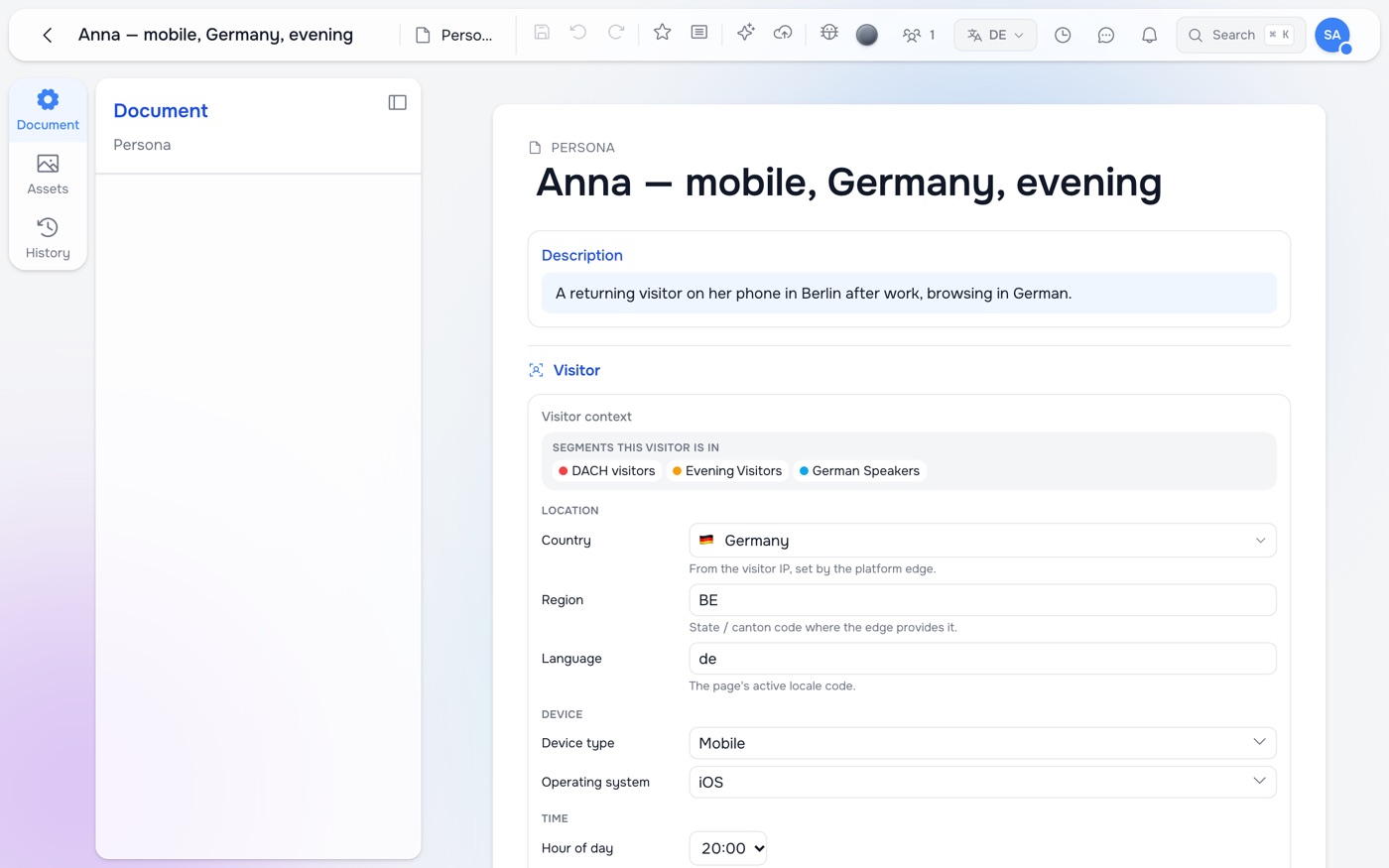
Personas are example visitors: a country, a device, a time of day, a language, signed in or not, trait values. They don’t target anyone; they let you look. Each persona shows the segments it falls into as you edit it.
Step by step: an offer for a campaign, a welcome for returning visitors
This walkthrough builds a block that greets three kinds of visitor differently: people who first came from the autumn campaign get the campaign offer, people on their second visit or later get Welcome back, and everyone else gets the default. Nothing here needs a developer once the site has the visitor profile switched on (see What the browser learns).
1. Declare a trait the browser learns. In Personalization → Traits, create a trait called First campaign. Set Kind of value to Text, and under How it’s filled choose Learned from what they do. Add one rule: When the visitor arrives from a campaign, From the campaign name (utm_campaign), Then remember the first one. Its key — the name the site and rules use — comes from the label: first_campaign.
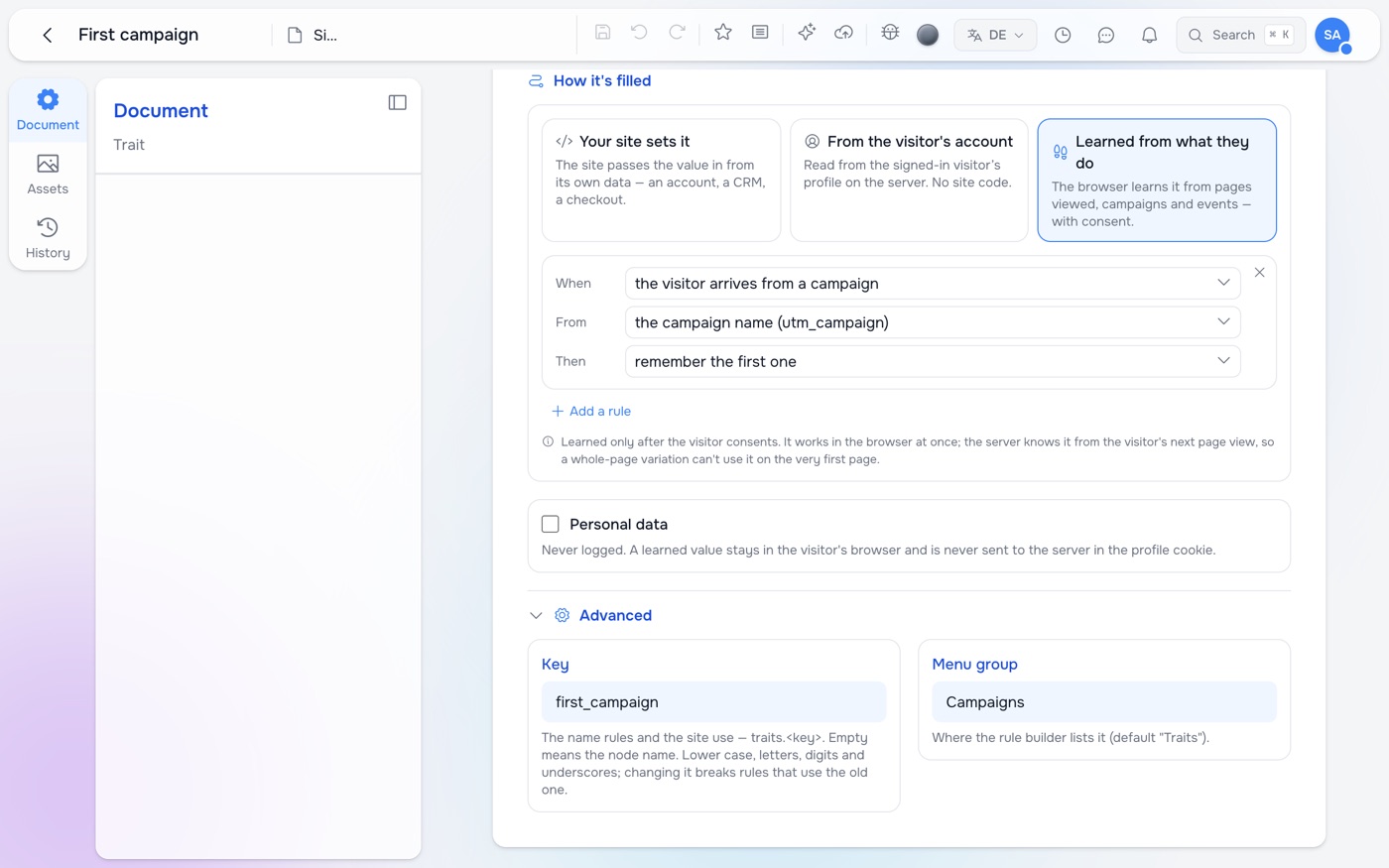
Other rules work the same way: when the visitor views a page → add the page’s tags collects interests from what they read (make the trait Several from a list and list the allowed topics), → count it counts views of the pages you name with a path such as /pricing*, and when the site reports an event → set it to yes records something the site tells the profile about, such as a newsletter sign-up.
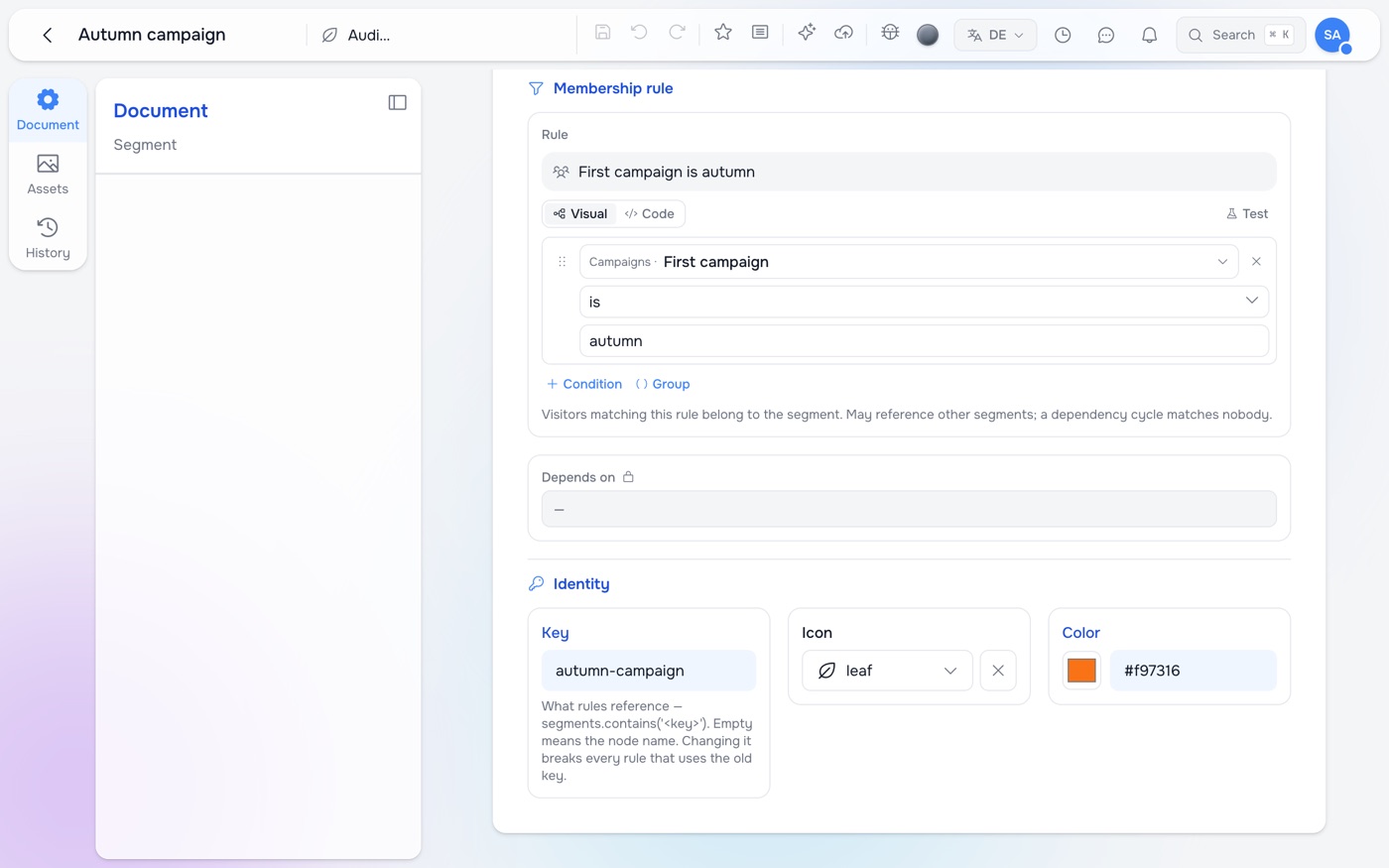
2. Make segments from it. In Segments, create Autumn campaign with the rule First campaign is autumn. Create a second segment, Returning visitors, with Visit count ≥ 2 — the visit history needs no trait, the profile keeps it on its own.
3. Add the Switcher. On the page, add a Switcher with three variants: Autumn campaign (rule: Segment is in Autumn campaign), Returning visitors (Segment is in Returning visitors) and a default without a rule. The first variant whose rule matches wins, so put the more specific one first.
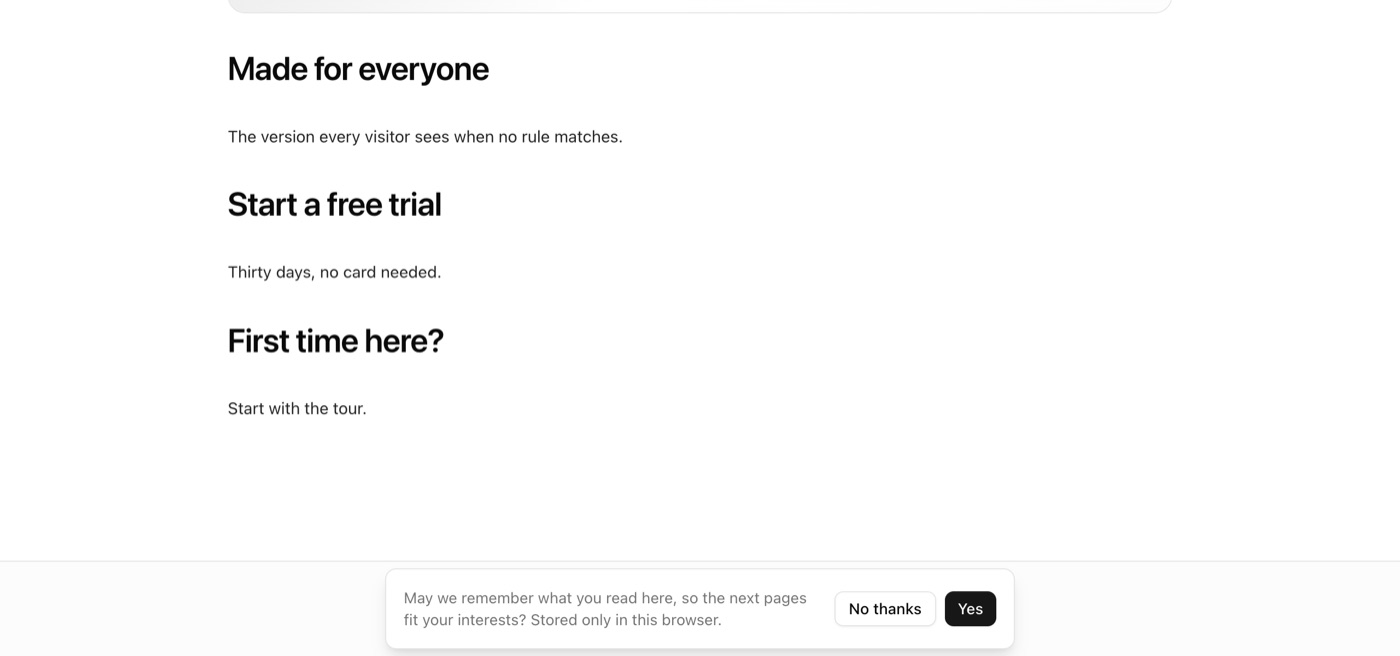
4. Check it. Open the page as a new visitor — a private window is easiest. The site asks once whether it may remember the visit; before the visitor says yes, nothing is stored and they see the default.
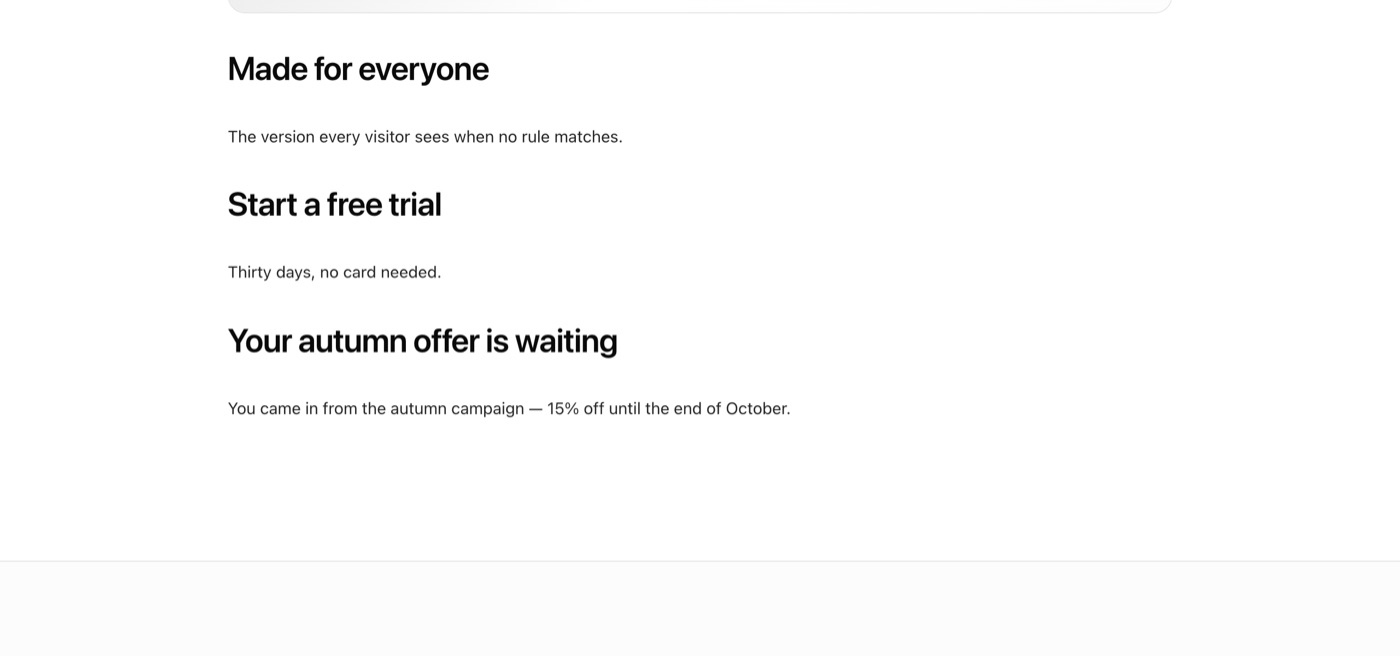
After Yes, open the page again with ?utm_campaign=autumn at the end of the address. The block switches to the campaign offer at once, and it stays when you remove the parameter: the browser has learned First campaign, and from the next page on the server renders the offer straight away.
A visit counts as a new one after 30 minutes without a page view, so Welcome back appears on the visitor’s next visit (for visitors who did not come from the campaign — the campaign variant is first). To start over as a new visitor, use a new private window.
View as: the page as one visitor sees it
In the page editor, View as picks a persona — or adjusts country, device, time and sign-in on the fly — and every Switcher on the page shows what that visitor gets, on the live page in the editor.
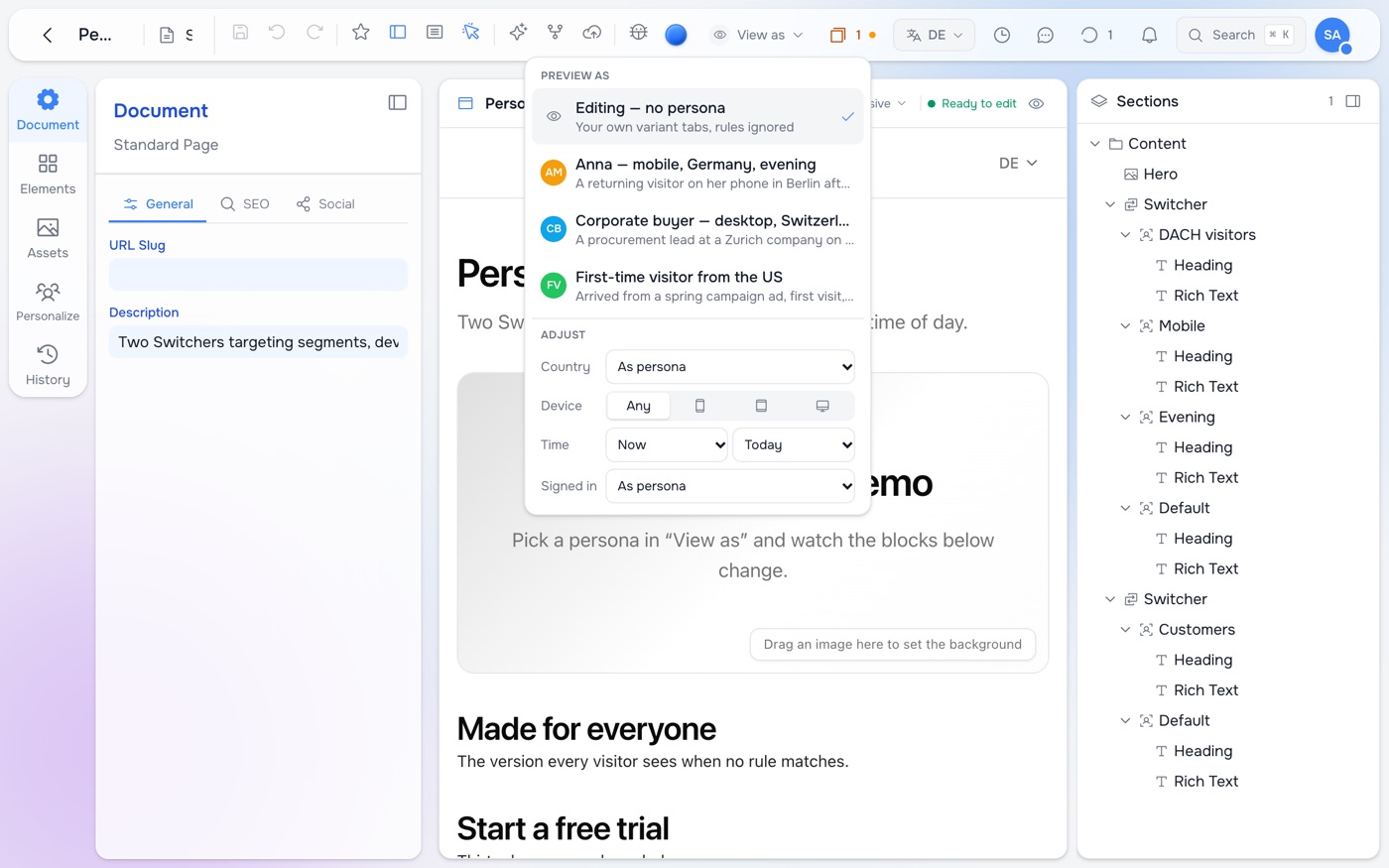
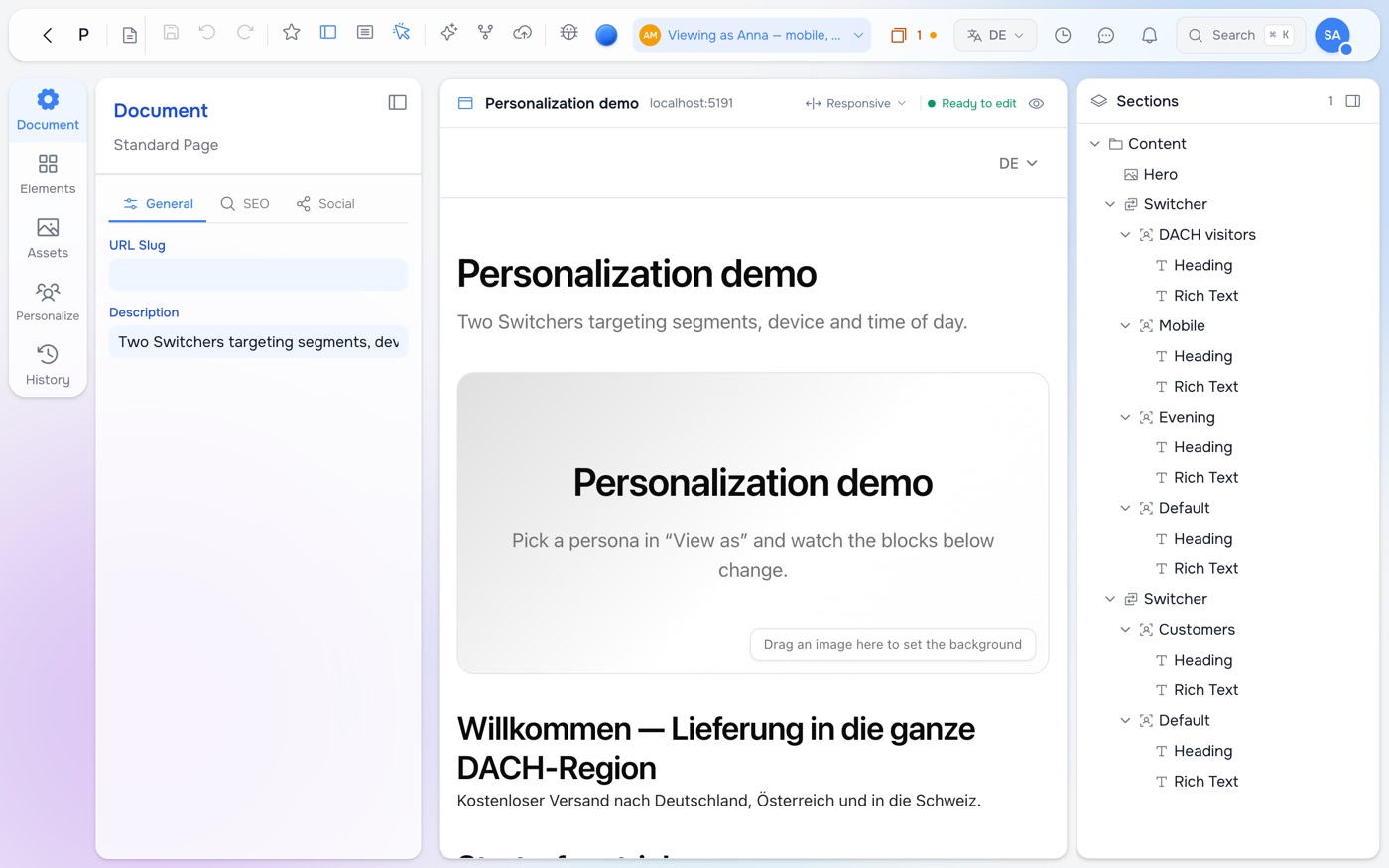
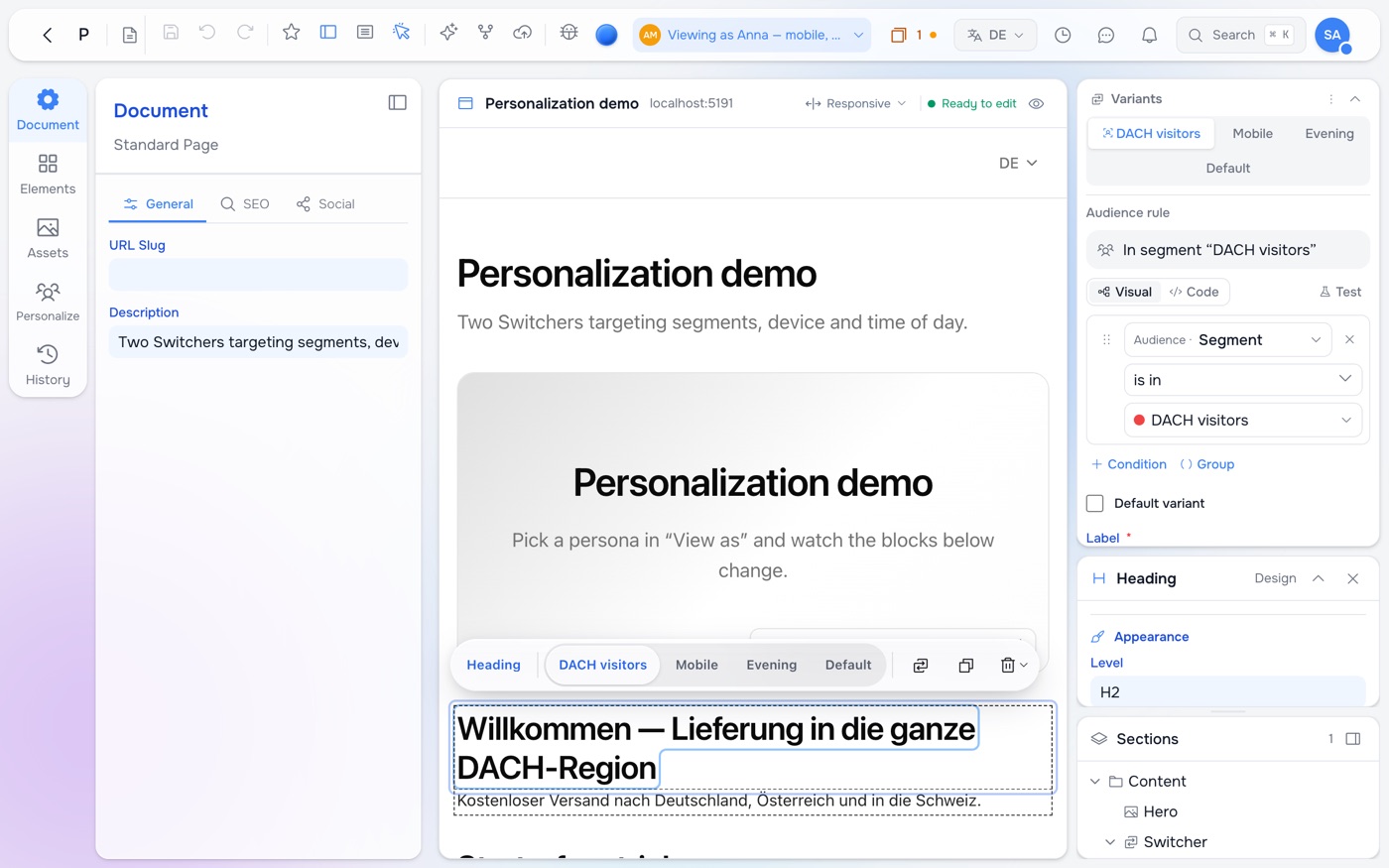
Select a block inside a Switcher and the design panel shows its variants as tabs, with the rule of the one you are on. The selection toolbar on the page switches variants too. Click a variant the persona doesn’t get and Studio says so — not what Anna sees — with a button to go back to theirs. Choose Editing — no persona to return to plain editing.
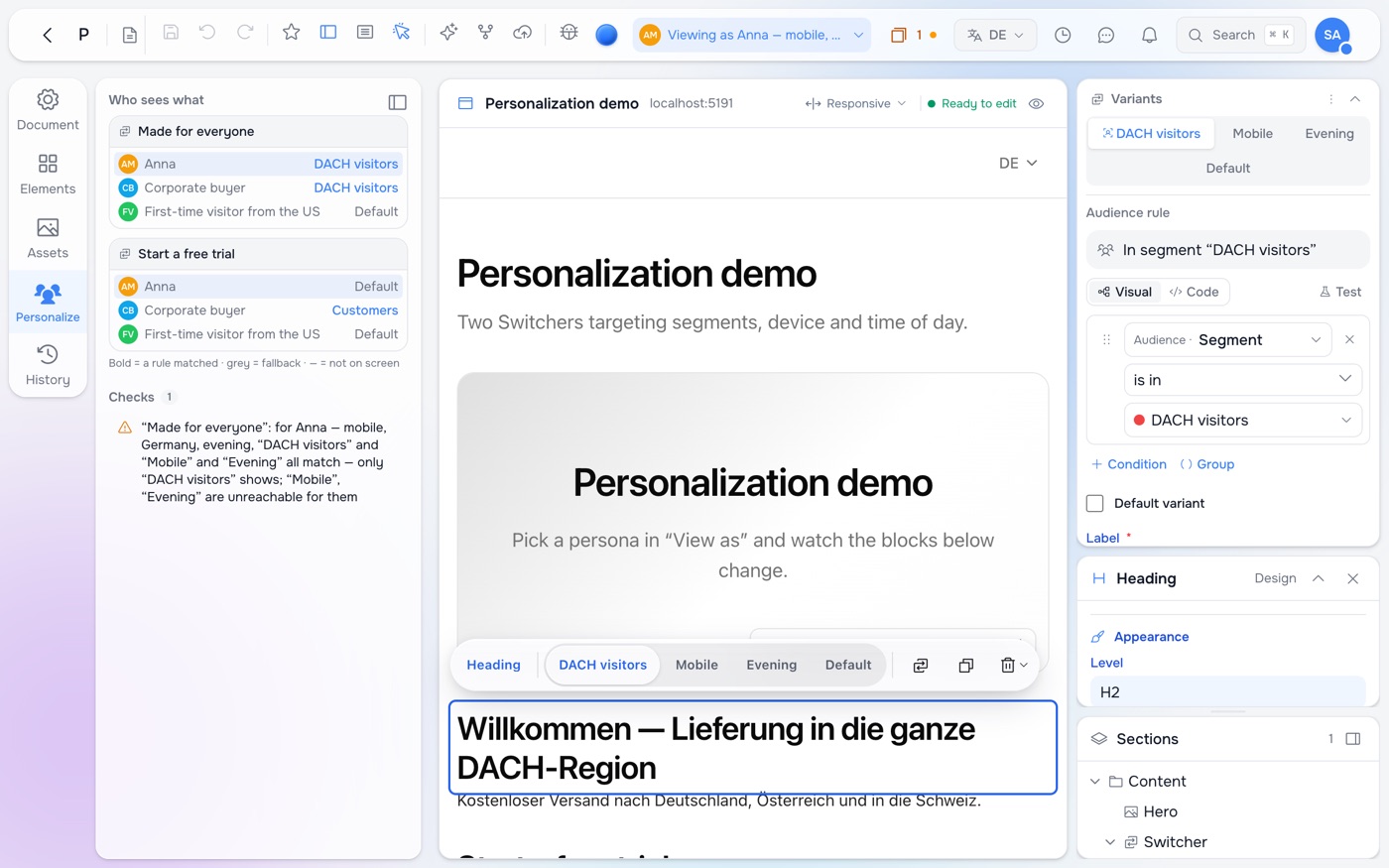
The Personalize panel lists every Switcher on the page with the variant each persona gets — who sees which variant, and which page version they land on — and checks the setup: two variants that both match one persona (only the first ever shows), variants nobody can reach, rules that can’t work where they are used, missing segments.
Open preview as opens the site preview rendered for the chosen persona. It works only inside a signed Studio preview session; a visitor who adds ?persona= to a URL gets the ordinary page.
Page variations: a whole page
Sometimes it is not one block but the page: a landing page with a different structure for returning customers, a home page for a campaign week. A page variation keeps several complete versions — each with its own title, SEO and blocks — behind one URL, with a rule each. loadPageVariation in the loader picks one the same way Switchers are picked, before the page renders; the URL does not change. Page variations are decided on the server, so they use the signals the server knows; for time of day use a Switcher inside the page.
Use a Switcher when part of a page differs; a page variation when the page’s structure differs. Both can nest.
In the renderer
The loader builds the visitor context once and hands it to the helpers:
import { contextFromRequest, resolveSegments } from '@maravilla/studio-content/personalize';

const base = { ...contextFromRequest(request), locale };  // country, device, referrer, utm, query
const { segments } = resolveSegments(segmentNodes, base);  // studio:Audience nodes, cached briefly
const visitor = { ...base, segments };
contextFromRequest reads the country the platform edge sets (X-Country-Code; CF-IPCountry and X-Vercel-IP-Country work too), the device from the User-Agent, the referrer and the campaign parameters. The same visitor goes to loadPageVariation({ ctx }) and to the framework helper that resolves Switchers — useVariantContent in React and Vue, variantContent in Svelte. Rules run as small compiled functions in plain JavaScript: no eval, nothing extra to download.
Time-of-day rules are the one thing the server doesn’t decide: the server renders without a clock, and the browser re-picks just after load, only when the pick actually changes.
Caching
A page whose rules read the country is still cacheable — per country. cachePolicyFor(contentRuleRefs(content, segmentNodes)) tells you what the response must declare for the rules this page actually carries: Vary: X-Country-Code for country rules, private for rules on device, referrer, visit, user or traits. Segments are expanded to what they read, so a page targeting “DACH visitors” varies on the country only. A page without rules caches like any other, and a persona preview is never cached. The example sites wire this up in their route’s headers.
What the browser learns
A learned trait and the visit history (first visit, visit count) live in the visitor’s browser, in a small profile the site creates with @maravilla/studio-content/profile. Nothing is stored until the visitor agrees; after that, every page view and every event the site reports runs the learn rules, and the page re-picks its variants on the spot. A compact copy goes into a first-party cookie, so from the next page on the server renders the right variant straight away — including whole-page variations. Traits marked as personal data never leave the browser.
Switching it on is two calls in the site, once — after that, authors add learned traits in Studio without touching code:
// server: once per site
import { createPersonalization } from '@maravilla/studio-content/personalization';
const pz = createPersonalization({ query, previewSecret });
const visitor = await pz.visitor(request, locale);        // what a rule can know about this visitor
const headers = await pz.cacheHeaders(content, visitor);  // what a shared cache must do for this page
const catalog = await pz.browserCatalog();                // what the browser re-picks with

// page: React and Vue (Svelte: personalizedContent)
const view = usePersonalizedContent(content, { visitor, editing, catalog, page });

// your consent banner or consent manager
setPersonalizationConsent(true);
getVisitorProfile()?.track('newsletter_signup');          // an event a learn rule names
Everything has a way out. extend adds what only your site knows — the signed-in user, its own traits, a customer-data platform’s segments — and account hands over the visitor’s account for traits filled from it. The catalogue can come from your own loaders instead of SQL, consent from your consent manager, and every building block underneath (contextFromRequest, resolveSegments, profileFromRequest, createProfile, useVariantContent) stays available if you would rather compose them yourself.
The same framework-free store re-picks variants in React, Svelte and Vue — the framework helpers are thin wrappers around it — and segments built on the clock or on what the browser learned — Evening visitors, Returning visitors — match there too. Astro renders each page once without a browser step, so there a learned trait applies from the visitor’s second page. The cookie is written by the visitor’s browser: good for choosing which version someone sees, never for deciding what they may see.
Where the application comes in
On a plain website the context is what the request says. An application knows more — the visitor is signed in, has a plan, has not finished onboarding — and this is the seam where the two meet:
- The app authenticates the visitor with its own means (its own database, its own sessions).
- It adds what it knows to the context:
{ ...visitor, user: { authenticated: true }, traits: { plan: 'pro', onboarding: 'done' } }. - Those traits are declared in Studio, and authors write rules against them with no deployment: a “Welcome back” hero for signed-in visitors, a pricing block hidden for the enterprise plan.
- A block placed by an author may render the app’s data: a
RecentProjectsblock registered by the app takes its heading and empty-state copy from Studio and its rows from the app’s database.
The app owns identity and data; Studio owns the words and the structure, including the decision of which structure this visitor gets. Keep the traits few and stable — they are the vocabulary authors write rules in.
For agents
The Studio MCP server exposes all of it: listing signals and declaring traits — including how each is filled, learn rules and all — creating and checking segments and personas, explaining a rule for a persona clause by clause, listing a page’s personalisation with its checks, showing which variant every persona sees, adding and editing variants, and previewing a page as a persona. An assistant can set up a campaign’s segments and variants and check them the same way an author would.
Pilot documentation. Studio is in a partner pilot. Screens and YAML shown here are current as of the version noted on each page; tell your Maravilla contact when something does not match what you see.