Build a chatbot on your content
A chatbot here is an agent with retrieval tools. There is no separate chatbot product: the same agent that routes a support mail can answer questions about your handbook, once it can search it.
Studio ships one ready to use — Research Assistant, at
/agents/research-assistant — and it is also the worked example for building
your own.
Give it the tools
An agent lists the functions it may call. Three turn it into a chatbot:
node_type: raisin:AIAgent
properties:
  provider: openai          # a provider configured on the tenant
  model: gpt-4o
  temperature: 0.2
  execution_mode: automatic
  tools:
    - /lib/raisin/ai/search-documents
    - /lib/raisin/ai/ask
- /lib/raisin/ai/graph-contextsearch-documentsreturns passages and lets the agent reason over several.askdoes the whole retrieve-and-answer round trip for a straightforward question, and comes back with citations already attached.graph-contextanswers the relationship questions — who is involved, what this belongs to, what else mentions it.
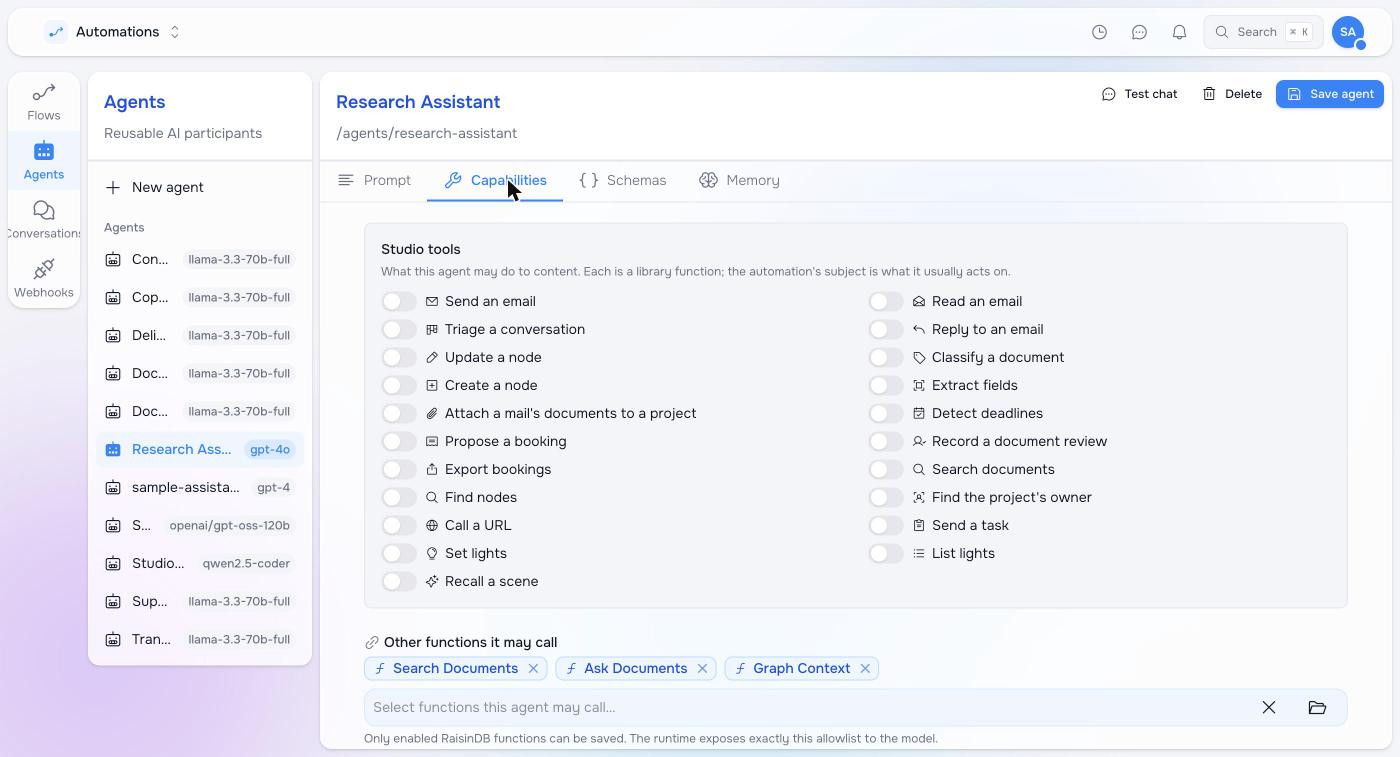
Give it all three and let it choose; give it only ask if you want the cheapest
possible path and no reasoning across documents.
provider and model are required, and must name a provider your tenant has
configured. An agent missing either is rejected at install time, quietly — if
your agent does not appear, that is the first thing to check.
Write the prompt that keeps it honest
The tools do the retrieval. The prompt decides whether it uses them:
system_prompt: |
  You answer questions from the documents stored in this workspace.

  - Search before you answer. You do not know what is stored here, and
    answering from general knowledge is the failure that matters.
  - Cite the document you took each claim from.
  - When the documents do not cover something, say so plainly. That is a
    correct answer. Do not fill the gap, and do not soften it into a guess.
  - If a search comes back empty, try again with the words the documents
    would use, not a rephrasing of the question.
Every line of that is load-bearing, and the third most of all. A model asked about something absent from your content will produce a fluent, plausible answer from its training, and nothing in the reply will mark it as invented. “Say so plainly” has to be stated as the correct outcome, because a model treats a grudging fallback as something to avoid.
Where it can be talked to
The same agent, three surfaces:
| Surface | Use it for |
|---|---|
| Inbox | Staff asking questions in the Workplace, with history and handover |
| Automation | A Talk it through step: the agent asks until it has what the prompt told it to get |
| Your website or app | A chat widget on a public site — see Search and chat on a website |
The Inbox is where to start. It needs no code, the conversation is ordinary content you can read and audit, and the agent answers in a thread a person can correct.
Scope what it can see
An agent searches as the caller. Row-level security applies to retrieval exactly as it does to any other read, so a chatbot cannot surface a document its user could not open.
But row-level security decides what a reader may see, not what your bot should answer from. Name the corpus:
{ "question": "what is our refund window?", "workspaces": "handbook, policies" }One name, a comma-separated list, a glob such as content-*, or
'ALL READABLE'. An internal assistant can reasonably take everything readable;
a public widget should be scoped to the published site and nothing else, because
“the visitor may read it” and “we meant to answer from it” are not the same
statement. See
Choosing the workspaces
for the full grammar.
Before you ship it
- Ask it five questions you know the answers to. Check the citations point at the passage that actually says it.
- Ask it something your content does not cover, and confirm it refuses. This is the test people skip and the one that fails in front of customers.
- Ask the same question in the words a customer would use rather than the words your documents use. If retrieval misses, the answer is usually better content or a better chunking rule, not a better prompt.
Next
- Answering questions from your content — what the tools return and what they cost.
- AI agents in automations — the other four ways an agent step is used.
Pilot documentation. Studio is in a partner pilot. Screens and YAML shown here are current as of the version noted on each page; tell your Maravilla contact when something does not match what you see.