Search, indexing and the knowledge graph
Three things make content findable, and they are built from the same nodes you already author. Nothing here is a separate search product to populate.
| Finds | Built from | |
|---|---|---|
| Full-text | The words that are actually there | Fields marked Fulltext |
| Vector | Text that means the same thing, in any wording | Fields marked Vector |
| Graph | How things relate — who, what belongs to what | Relations between nodes |
Full-text and vector run as one query and are fused by rank, so a search finds both the exact term and the paraphrase. The graph answers a question neither can: that two documents are about the same organisation, when nothing in either text says so.
What gets indexed
The node type decides. A field marked index: [Fulltext, Vector] is reachable
by word and by meaning; one marked [Fulltext] only by word.
Mark both legs, or the ranking quietly skews. Fusion assumes the two legs
see the same corpus. A field that is Fulltext but not Vector puts documents
in one leg’s reach and not the other’s, and the fused ranking then favours the
leg with the wider coverage — no error, no log line, just an order nobody chose.
For uploaded files there is a second body: extracted text. A PDF is read
server-side; a .docx, .pptx or .odt is converted by the media plugin and
handed back. Either way the document’s text lands on the asset node and is
indexed like any other content — which is why a phrase inside a contract is
findable without anyone copying it into a field.
How long documents are split
A long document is cut into chunks, and each chunk gets its own vector.
This is not a detail you can skip. One vector averaged over a forty-page contract sits close to every query and specific to none: searches return the document for everything and for nothing, while the index reports itself healthy. Chunked, a question about the notice period lands on the clause about the notice period.
Document bodies are chunked automatically — 512 tokens with a 64-token overlap — whether or not anyone configures anything. The overlap is deliberate: a clause that straddles a page break survives in one piece.
A node’s own fields are not chunked unless you ask. A title and a caption are short, and splitting them makes every fragment match everything.
Changing it
Chunk sizes are part of a processing rule, so they can differ per kind of content — the routing table that already answers “what is this?” also answers “how should it be split?”.
In the admin console, open Processing Rules, add or edit a rule, and turn on
Override Chunking Settings. A rule matches on node type, path pattern,
workspace or mimetype, so “everything under /handbook/** chunks at 1024” is
expressible without touching anything else.
One thing to know: sizes are counted in tokens only when a tokenizer is
named, and in characters when it is not. The console fills in a tokenizer for
you. If you write rules through the API, set tokenizer_id — otherwise
chunk_size: 512 quietly means 512 characters, about a paragraph.
Turning embeddings on
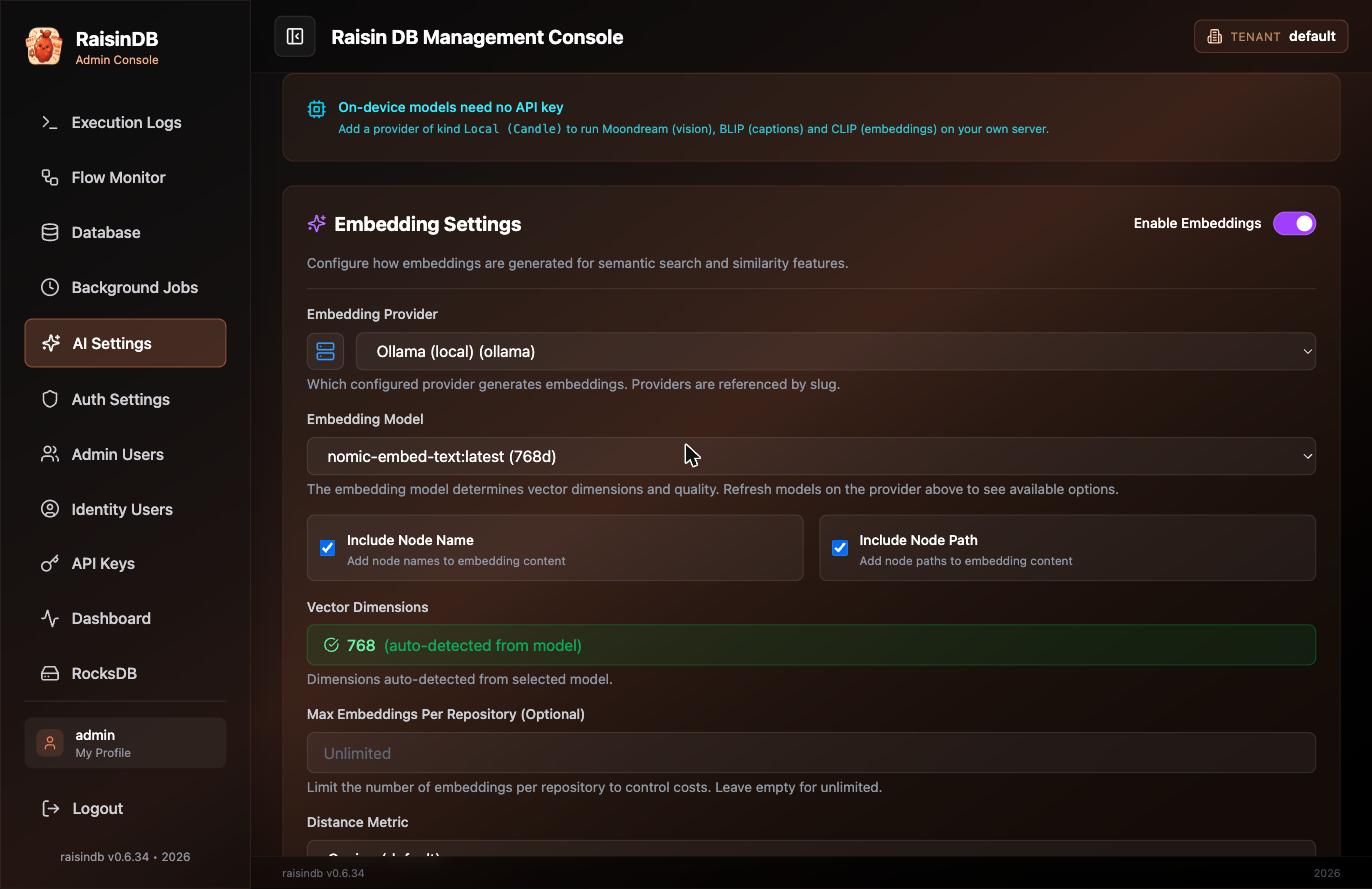
Vector search needs an embedding model. It is configured once per tenant, in the admin console under embedding settings: a provider, a model, and its key. The keys live in tenant configuration, never in content.
Without one, full-text search still works and vector search is simply off. Content written while embeddings were disabled is indexed as soon as it is saved again, or by a rebuild.
Checking it worked
Search from SQL, and ask for passages rather than documents:
SELECT path, chunk_index, chunk_text, chunk_text_source, vector_distance, score
FROM HYBRID_SEARCH('how much notice to terminate', 5,
                   workspaces => 'handbook', granularity => 'chunk');
granularity => 'chunk'returns one row per passage, soLIMIT 5means five passages and several may come from one document. That is what a chatbot’s context window wants. The default returns one row per document.chunk_textis the passage, andchunk_indexsays where in the document it came from — the two you quote when citing an answer.- The workspace scope is required. Name one, a comma-separated list, a glob
such as
content-*, or'ALL READABLE'for everything the caller may read. There is no silent default, so you can always read the corpus off the query.
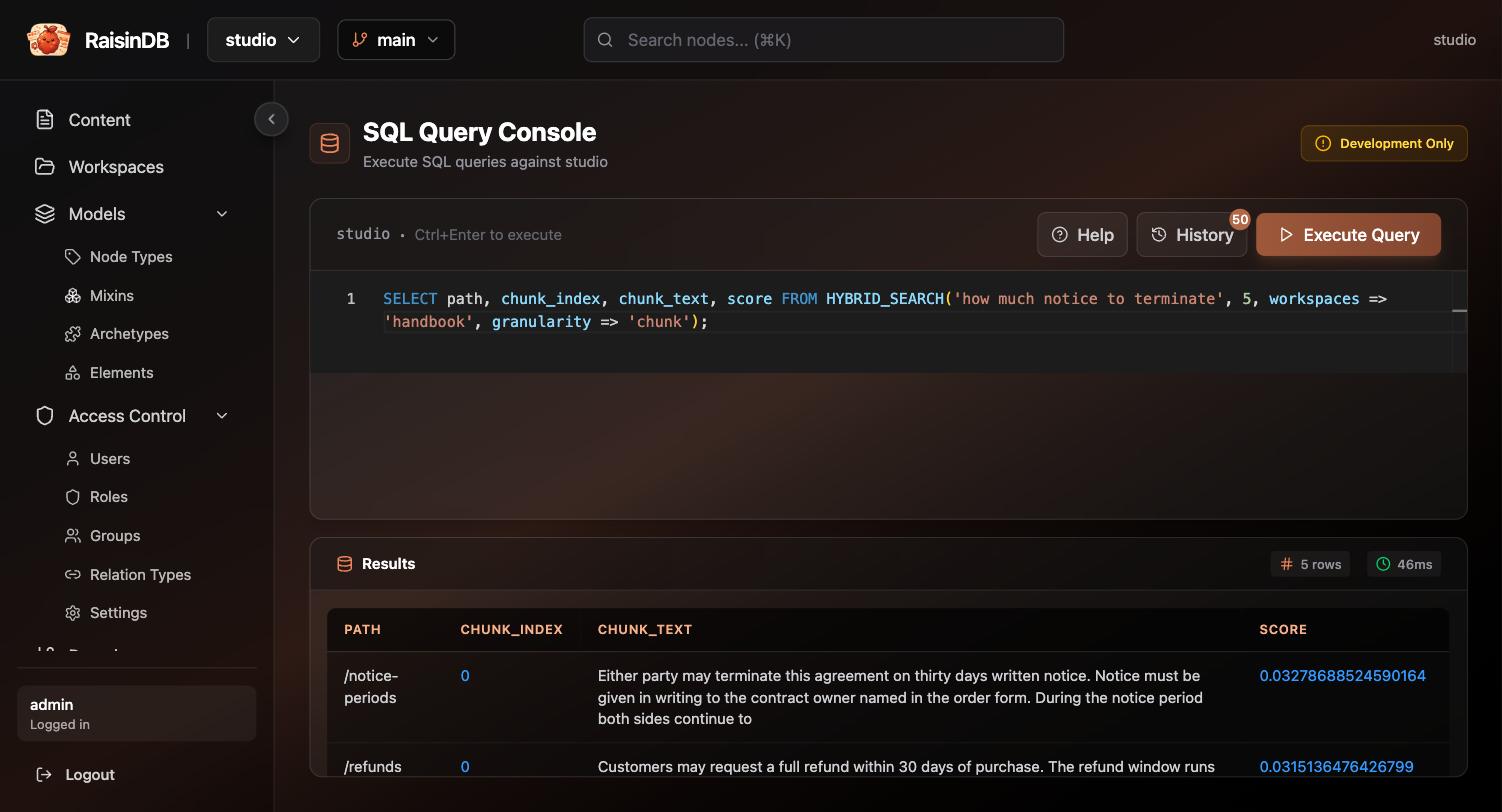
chunk_text is what the reader sees; chunk_index is how you cite it.Reading the result honestly
Three more columns exist for exactly this, and they are the difference between “the query ran” and “the query was right”.
vector_distance is the number that means something. Cosine distance, 0.0
identical to 2.0 opposite, and results are cut at 0.6 by default — settable
per tenant, or per query with max_distance =>. A good hit sits around 0.40
and the next document a clear step behind it. This is what you threshold on.
score is rank fusion, not similarity. The two legs are merged by
reciprocal rank — each contributes 1/(60 + rank) — so the numbers are small,
they bunch together, and the ceiling is about 0.033, for a passage that came
first in both legs. Sort by it; never threshold on it and never show it to a
reader as a confidence. It is not comparable between two queries: a question
your content cannot answer still returns a ranked list with ordinary-looking
scores, and can even out-score a question your content answers well.
vector_distance IS NULL means the vector leg never returned that row. It
matched on words alone. That is not a fault — fusion is the union of the two
legs, which is the whole point of running both — but it is why a query can come
back with more rows than it has good answers: the full-text leg has no distance
cutoff, so anything sharing a word with the question is eligible. fulltext_rank
and vector_rank tell you which leg found each row. When you want the vector
leg’s judgement alone, say so:
-- only rows the vector leg actually admitted
... WHERE vector_distance IS NOT NULL
-- or drop the lexical leg entirely
HYBRID_SEARCH(..., fulltext_weight => 0)
chunk_text_source says whether you are holding the whole passage. exact
means the text was recovered from the stored span and is the passage in full;
excerpt means you have a stored preview of the opening of it; unavailable
means no text was stored for that row. Check it before quoting chunk_text back
to a person — an excerpt ends where the preview ends, not where the sentence
does. It is the same distinction ask reports as
text_is_exact.
Deciding whether the passages answer the question at all is not any of these
columns’ job — that is what
ask and its grounded flag
are for.
If a search returns nothing you expected, check in this order: is the field marked for the leg you are searching, is the embedder configured, and has the node been written since either changed.
The knowledge graph
Vector search finds documents that read like the question. It cannot tell you that two of them concern the same supplier, because the text never says so.
A relation does. It is a typed, directional link between two nodes that exists whether or not either one mentions the other:
RELATE FROM path='/entities/dana-weber' IN WORKSPACE 'library'
       TO   path='/entities/acme-marine' IN WORKSPACE 'library'
       TYPE 'works_at';
Relations are not the same as references, and the difference decides which one you want:
| Reference | Relation | |
|---|---|---|
| What it is | A property pointing somewhere — an author field, a hero image | An assertion: RELATE … TYPE 'works_at' |
| Lives in | The node’s own properties | Its own index, independent of both nodes |
| Carries a label | No | Yes — the type is the label on the arrow |
| Exists because | The content says so | Someone asserted it |
An extracted knowledge graph is the second kind. “Acme employs Dana” is a claim
about the world, not a field on a document, and works_at has to be the label
on the edge.
Entities are built from your documents automatically — see Answering questions from your content. Two documents naming the same organisation converge on one entity node, and that shared node is the connection neither document could make alone.
Pilot documentation. Studio is in a partner pilot. Screens and YAML shown here are current as of the version noted on each page; tell your Maravilla contact when something does not match what you see.