Connectors and mounts
Everything an automation reacts to is a node. A virtual mount makes that true for things that live somewhere else: a Microsoft 365 mailbox, a OneDrive folder, a Stripe account, the lamps in a room. A small adapter function translates the external system’s items, and RaisinDB writes them into a workspace as ordinary nodes through its normal write path. From then on the rest of the product does not know or care: triggers fire on them, SQL finds them, the Workplace board files them, and a property write on one of them travels back to the provider.
The model
| Thing | What it is | Where |
|---|---|---|
| Connector | A provider’s OAuth setup and its adapter, shipped by a package as a template | raisin:system workspace, /connectors/<name> |
| Integration | The live, connected copy: the tenant’s credentials and connected accounts. Packages never overwrite it. | /integrations/<name> |
| Mount | One subtree of one provider mounted into one workspace: which account, which remote root, which path, which write mode, how often | /mounts/<name> |
| Synced node | A normal node carrying __virtual, __mount_id, __external_id, __etag, __synced_at | the target workspace |
The engine syncs every due mount on a scheduler: a full walk first, deltas from a cursor afterwards, an unchanged item skipped by its etag, and deletes scoped to the mount so a node you created under the mount path is never touched. Credentials are encrypted at rest and the adapter is handed an access token only; refresh tokens never reach function code.
Write modes decide what a local change means:
| Mode | The node is | A local change |
|---|---|---|
off | read-only | nothing happens |
state_only | an immutable record with mutable state | only the listed fields propagate — mark a mail read, RSVP an event |
mirror | the remote object | create, update and delete propagate — a lamp, a file |
submit | a command | creating it and setting status: queued issues it once, never retried — send a mail, start a checkout |
submit is the shape for anything that moves money or sends messages: the command node is the audit record, and a function that writes one is the only way to act.
Connecting one
In the admin console, Integrations lists the connectors installed on the tenant. A managed connector needs one click — Connect account — because Maravilla owns the OAuth registration and the sign-in goes through connect.maravilla.cloud. Then Mounts → Add bundle offers the connector’s recommended layout, asks its few questions, and creates the mounts. Open each mount after the first walk and check it reports written greater than zero, not merely ok: a mount whose target workspace refuses the node type reports success, writes nothing, and stays empty for good.
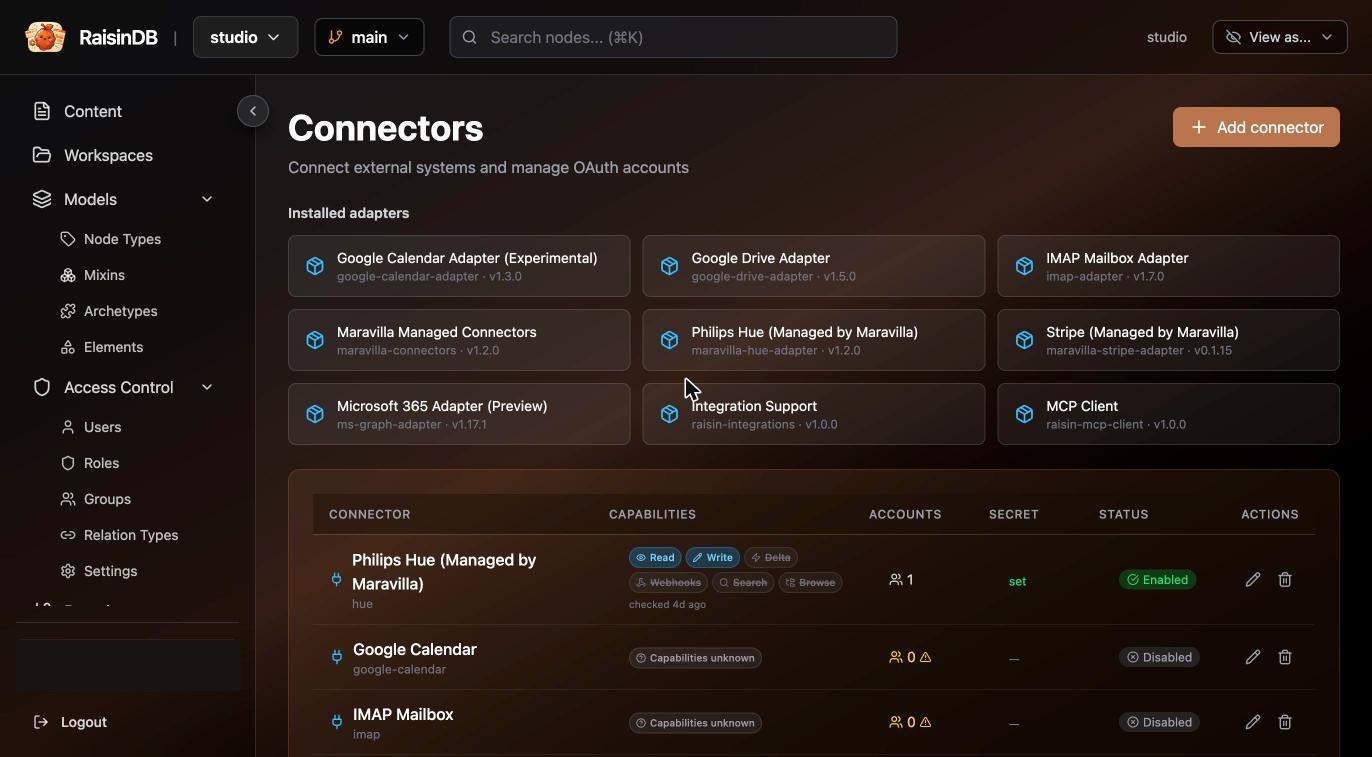
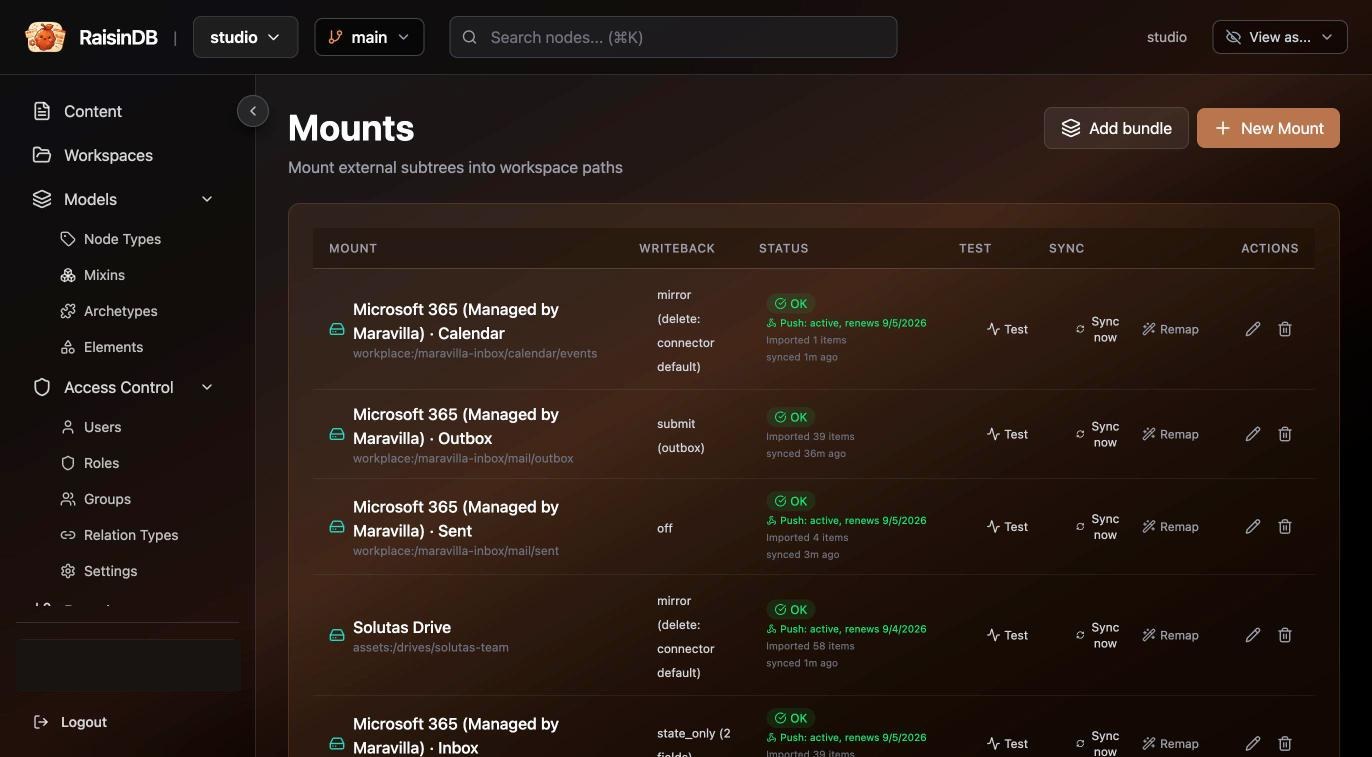
Studio shows synced content with a cloud marker on the card, and a Sync connected drive action that re-runs the mount (delta or full) and records the outcome on the node.
Microsoft 365
The managed Microsoft 365 connector is the generic Microsoft Graph adapter with Maravilla’s OAuth in front of it; there is nothing to register in Entra. Its bundle mounts:
workplace:/microsoft-365/
├── mail/
│   ├── inbox     state_only  — read state flows back            (default)
│   ├── sent      off                                            (default)
│   ├── drafts    off                                            (opt-in)
│   └── outbox    submit      — creating a node here SENDS mail  (default)
└── calendar/
    ├── events    state_only                                     (opt-in)
    └── actions   submit      — RSVPs                            (opt-in)
assets:/drives/onedrive       off                                (opt-in)
Mail is four mounts because a mount has one write mode, one delta cursor and one backfill each: the outbox must be submit, the inbox must not, and a slow Sent backfill must not stall the Inbox. The bundle asks whose mailbox (principal, blank for the signed-in user, an address for a shared mailbox), whether to mount one folder or the tree, and, for files, whether the drive is personal, another user’s, or a SharePoint site.
That is what a Workplace mailbox is: Studio finds the inbox mount by the mail it contains and records it as a studio:Mailbox, the board’s state lives on a sidecar per conversation (a synced mail cannot carry Studio fields), and Reply to an email writes the reply into the outbox mount. See Workplace.
Philips Hue
The short version; the Philips Hue chapter has the model, the steps with screenshots, the trigger and the agent.
The Hue connector is Maravilla-managed and ships its own adapter, node types (hue:Light, hue:Room, hue:Zone, hue:Scene, hue:GroupedLight) and mapper. Its bundle creates two mounts: the home — every light, room, zone, scene and grouped light of the bridge, mirrored — and a scene outbox where a scene recall is submitted as a command. Lights are flat under the mount, named by the bridge’s id, with the human name in name; a room names its grouped light, a scene names its room.
Three library steps work against that layout, so an automation never touches the Hue API:
| Step | Does |
|---|---|
| Set lights | Turns a light, room or zone on or off and sets brightness (0–100), a hex colour or a colour temperature in kelvin. A room or zone is written as one grouped command, never a loop over lamps. |
| List lights | The inventory as an agent or a later step needs it: lights with state and room, rooms with how many lamps are on, zones, scenes — and a one-line-per-item listing for a prompt. Offered to agents as a tool. |
| Recall a scene | Activates a scene (“Evening”, “Relax”) on its room or zone, optionally dimmed and faded, by queueing a command in the scene outbox. |
The step’s Light, room or zone argument is a picker: it searches the synced nodes of those types by name, so an author chooses “Living room”, not a bridge id. It defaults to the node the automation is about, which is what a trigger on a light wants.
Under the hood a light change is a property write on the synced node. The connector’s write-back drain pushes on, brightness, color_x/color_y and color_temperature_mirek to the bridge within seconds — measured at two seconds on a live bridge — and stamps what it pushed, so a lamp reads back what you set. A scene is different: it has no state to converge on, so it is a hue:SceneRecall node created queued in the outbox mount and issued exactly once, with the outcome stamped on the node.
Reacting to a light is an ordinary trigger. Hue offers no push, so the mount polls the bridge (every five minutes by default) and a lamp switched on in the Hue app arrives as an Updated event on its node a few minutes later, written by the actor virtual-mount-sync:
trigger:
  kind: node_event
  workspaces: [devices]
  node_types: [hue:Light]
  event_kinds: [Updated]
  paths: [/hue/home/**]
  property_filters: { on: true }        # matched before a run is spent
Two things to know. The engine suppresses the echo back to the bridge, not the echo back to your trigger: a run that writes the same light re-fires, so filter on the property that must have changed, or write somewhere else. And a flow cannot see the actor; a first step that reads updated_by tells a person’s change from the bridge’s own sync.
Writing your own
An adapter is a raisin:Function, not a plugin: one handler, one operation argument, HTTP through raisin.http.fetch. Scaffold one:
raisindb create adapter acme-crm --provider acme-crm
cd acme-crm-adapter && raisindb package deploy . --repo studio --install
The generated package installs and answers capabilities before you write a line: an adapter function, a mapper, and a disabled connector template under _raisin__system/integrations/ with no secret in it. Its manifest carries category: integrations, which is what puts it in the console’s gallery.
function handler(input) {
  const { operation, params, credential, mount } = input;
  switch (operation) {
    case 'capabilities': return { supports_changes: true, can_write: true, can_update: true, mutable_fields: ['status'] };
    case 'list':         return listChildren(params.folder_id, credential.access_token);   // the engine recurses
    case 'get_changes':  return changesSince(params.cursor, credential.access_token);
    case 'update':       return push(params.external_id, params.fields, credential.access_token);
  }
}
The minimum is capabilities plus list. The rules that matter:
- Errors carry a code.
auth_expiredmakes the engine refresh or pause,rate_limitedbacks off, anything else retries. Never turn an auth failure into an empty list: an empty list means “everything was deleted” and the reconcile will delete your nodes. external_idmust survive a rename;etagmust be stable when nothing changed.- The mapper is optional, pure, and works in both directions; without one, folders become
raisin:Folderand everything elseraisin:Node. - Pin
network_policy.allowed_urls: adapters run privileged. - Debug with Test connection in the console, which probes
capabilitiesand a boundedlistand caches the shape onto the integration. - Ship a mount bundle on the connector template when the provider needs more than one mount, and quote
'off'in its YAML.
A protocol that is not HTTP (IMAP was the first) becomes a native binding rather than an adapter; that is a platform change, not a package.
Where the connectors are
| Connector | Ships | Mounts into |
|---|---|---|
| Microsoft 365 (managed) | mail, calendar, OneDrive, SharePoint | workplace, assets |
| Google Drive (managed) | files | assets |
| IMAP | a mailbox, over a native binding | workplace |
| Google Calendar | events | workplace |
| Philips Hue (managed) | lights, rooms, zones, scenes | a devices workspace |
| Stripe (managed) | checkout sessions, refunds, payment intents, products, prices, customers | finance — see Payments with Stripe |
The generic adapters are labelled preview: the contract is frozen, and you validate a connector against your own account before relying on it. Push notifications from providers (webhooks into a mount) are experimental; polling is the default and works everywhere.
Pilot documentation. Studio is in a partner pilot. Screens and YAML shown here are current as of the version noted on each page; tell your Maravilla contact when something does not match what you see.